Showing posts with label Giveaway. Show all posts

List of Things You Can Get for Free With a .EDU Email ID

One of the perks of being a student is the ability to get student discounts. Many retailers offer handsome rebates on products such as clothing, magazine subscription, movie and flight tickets, insurance and of course, software. Some service related industries and software companies in particular give one hundred percent rebates on their products. In this article, we will focus only on those products. Those who are interested in all types of student discounts, a simple search for “student discounts” on your favorite search engine will reveal plenty of offers.

To be eligible for student discounts, sometimes all you need is a .edu email address provided to you by your university or college. If you have one and it still hasn’t expired, give yourself a shot at these freebies.

Microsoft DreamSpark

dreamspark
DreamSpark is a Microsoft program to provide students with Microsoft software at no charge. The program was originally available for university/college students in Belarus, Belgium, China, Finland, France, Germany, India, Italy, the Netherlands, Spain, Sweden, Switzerland, Tunisia, the U.K. and the U.S., but has now been expanded to more than 80 countries and is offered to many high school students. To register, students must visit the DreamSpark website and verify their identity. If an institution is not listed on the available list, the user may manually verify their student status by uploading a proof such as an ID card.
Software that are available for free download through the DreamSpark program include multiple editions of Visual Studio, Expression Studio, Microsoft SQL Server, Windows Server, and Windows Embedded. DreamSpark also offers waiver on Windows Marketplace and Windows Store, and from time to time, announces discount on flagship products such as Microsoft Office and Windows.

Autodesk

autodesk
Autodesk is terribly philanthropic towards students. Under their students program, the software company gives away practically everything they own, which includes:
AutoCAD for Mac
Autodesk 3ds Max
Autodesk 3ds Max Design
Autodesk Alias Automotive
Autodesk Alias Design
Autodesk AutoCAD
Autodesk AutoCAD Architecture
Autodesk AutoCAD Civil 3D
Autodesk AutoCAD Electrical
Autodesk AutoCAD Map 3D
Autodesk AutoCAD Mechanical
Autodesk AutoCAD MEP
Autodesk AutoCAD P and ID
Autodesk AutoCAD Plant 3D
Autodesk AutoCAD Raster Design
Autodesk AutoCAD Structural Detailing
Autodesk Ecotect Analysis
Autodesk Fusion 360
Autodesk Green Building Studio
Autodesk Impression
Autodesk InfraWorks
Autodesk Inventor Professional
Autodesk Inventor Publisher
Autodesk Maya
Autodesk MotionBuilder
Autodesk Mudbox
Autodesk Navisworks Manage
Autodesk Quantity Takeoff
Autodesk Revit
Autodesk Revit Architecture
Autodesk Revit MEP
Autodesk Revit Structure
Autodesk Robot Structural Analysis Professional
Autodesk Showcase
Autodesk Sim 360
Autodesk Sim 360 Pro
Autodesk Simulation CFD
Autodesk Simulation Mechanical
Autodesk Simulation Moldflow Adviser Ultimate
Autodesk Simulation Multiphysics
Autodesk Smoke
Autodesk Softimage
Autodesk T_Splines Plug_in for Rhino
Autodesk tsElements Plug_in
Autodesk Vault Basic Server
Autodesk VRED Professional

Amazon Prime

amazon
Amazon Prime is a service under which the online retail giant offers free two-day shipping on all eligible purchases, as well as discounted one-day shipping rates, instant streaming of thousands of movies and TV shows with Prime Instant Video, borrow Kindle books for free reading and other benefits, for a flat annual fee (currently $79/year).
For students, Amazon offers this service free for 6 months after which they get a 50% discount.

LastPass Password Manager

LastPass Password Manager is an online password management service, and is available as a plugin for Internet Explorer, Mozilla Firefox, Google Chrome, Opera, and Safari. The basic service of LastPass is free, which includes one-click login, form filling and cross-browser synchronization. Under Premium subscription, one gets the ability to import and export data, backup and restore, stronger passwords and more.
Those having a .edu email ID can get LastPass Premium for 6 months.

The Washington Post

Founded in 1877, The Washington Post is one of the oldest and most widely circulated newspapers in the United States of America. The newspaper offers free digital subscription to anyone with a valid .edu, as well as, .gov and .mil email address.

WestHost

WestHost offers students with a .edu email ID, free webhosting for a year.

ZW3D

ZW3D is all-in-one, CAD/CAM software, which enables concept to finished product design in an integrated, collaborative environment. Supported by its Show-n-Tell built-in learning system, ZW3D includes data exchange to allow efficient reuse and sharing of designs, hybrid modeling with its unique Overdrive kernel, mold and die design with cavity preparation tools and component libraries, and intelligent, adaptive CNC machining from 2-axis through to 5-axis.
Students are offered free 12-month licenses.

Prezi

Prezi is a cloud-based presentation software, not unlike Microsoft PowerPoint, and storytelling tool for presenting ideas on a virtual canvas. The product employs a Zooming User Interface (ZUI), which allows users to zoom in and out of their presentation media, and allows users to display and navigate through information within 3D space.
Prezi can be used by teachers and students to collaborate on presentations with multiple users having access and the ability to edit the same presentation. At no extra cost, students can remove the Prezi logoi and replace with their own and also get 500MB of storage space.

GitHub

GitHub is a web-based hosting service for software development projects that use the Git revision control system. GitHub offers both paid plans for private repositories, and free accounts for open source projects.
GitHub offers Educational Accounts for academic people (student, teacher, etc.) for 2 years that includes 5 repositories. These plans usually cost between $7/month and $22/month.

Lucidchart

Lucidchart is a web-based diagramming software which allows users to collaborate and work together in real time to create flowcharts, organizational charts, website wireframes, UML designs, mind maps, software prototypes, and many other diagram types. Built on web standards such as HTML5 and JavaScript, Lucidchart is supported in all modern web browsers like Google Chrome, Firefox, Safari and Internet Explorer 8+.
Lucidchart offers Educational accounts, which are equivalent to Pro accounts, to all students having .edu, .ac.* and .k12.*.us email IDs for free.
Read more ...

Giveaway: Bitdefender Windows 8 Security

Bitdefender Windows 8 Security is a new antivirus product from Bitdefender tailored specifically for Windows 8. While there are many antivirus software available for Windows 8 (practically, any antivirus program that runs on Windows 7 is likely to run under Windows 8), Windows 8 Security has been designed by utilizing features unique to Windows 8.

The key addition to Bitdefender Windows 8 Security is the support for the new Early Launch Anti-malware (ELAM) feature. As already explained in another article, “Early Launch Anti Malware” provides a mechanism that allows anti-malware software to start before all other third-party components start, including drivers. This allows Bitdefender’s antivirus scanner files to load very early during the boot process, before the malware can load. This improves Bitdefender Windows 8 Security’s ability to detect and kill infectious programs.

bitdefender-win8-security

In addition, the program also includes a “Proactive App Scanner” that automatically analyses your Windows 8 apps and notifies you when one has been compromised. Also included is Bitdefender Safepay, a secured internet browser that keeps digital attacks at bay by automatically opening all your online banking and e-shopping pages in a separate, secure browser.

And of course, the interface is optimized for the Modern UI.

Everything else is identical to Bitdefender Internet Security 2013 (except the interface). This means that you’ve got a real-time scanner, vulnerability scanner, anti-spam, internet firewall, social networking protection, parental controls and more.

Bitdefender Windows 8 Security retails for $60 for 1 year of protection. Thanks to Bitdefender, we have 5 licenses of this antivirus scanner to giveaway to our readers. If you are interested in entering the giveaway contest, leave your name and a valid email ID in the form below. Winners will be selected by a random draw. The contest closes on February 19, 2013.

Read more ...

Grab The $149 Cyberlink PhotoDirector 3 For Free

Here is a quick heads up: CNET is offering Cyberlink PhotoDirector 3 for Windows absolutely free. The software normally sells for $149.95. The offer is valid for only 48 hours starting yesterday, so you only have a couple of hours left. To be precise, the offer ends at 11:59pm PT on Friday, February 1, 2013.

To get your free software, visit this page and click on the “GET IT NOW” button. This will take you to trialpay.com where you have to enter your name (fake name will do) and a valid email address (throwaway will do, if you don’t want CNET’s newsletters to fill your inbox) and then click Next. Almost immediately you will receive a download link and the activation key on the next page.

Cyberlink-PD3

From CNET

Cyberlink PhotoDirector 3 is an easy-to-use photography software for beginners and intermediate users alike. From the moment you import your photos - whether that be via your camera phone or an SD card, you can easily transform your photos into professional-looking photos in just a few clicks. Do you have facial blemishes you want to cover up? This software can do that for you and make those imperfections disappear - just like how they do it for celebrities in magazines.

Read more ...

Save ‘Giveaway of the Day’ Setup Files With UnWrapper GOTD

You must be familiar with Giveaway of the Day (GOTD). It’s a popular website that hosts software giveaway everyday, all round the year. Each software offered on the site is free only on that particular day and should be downloaded, installed and activated on the same day. A protection software included with the download makes sure that you cannot install the program once the 24 hour giveaway period has expired, even if you’ve still got the installer.

But there was a weakness in the Giveaway of the day wrapper that was exploited last year to extract the original installer of the program. Without the security of the wrapper, this program could then be installed at any date irrespective of the current giveaway at GOTD. It took the website’s programmers a few months before the loophole was fixed. The exploit doesn’t work anymore.

gotd-wrapper

The new wrapper is more secure that stops people from keeping the software for future installs and it reportedly utilizes a technology similar to rootkits. But the wrapper’s security has been broken once again, this time by Maximus, a member of the cracking group REVENGE Crew. It is a tiny portable executable, that allows you to extract the original setup installer from the new wrapper and keep it for later use, just like before.

This is how to use it: First, download the software from Giveaway of the Day and extract the contents of the ZIP file to a folder. Inside there will be a Readme.txt which will contain serial numbers, a Setup.exe and a Setup.gcd. Now run the UnWrapper GOTD executable and it will popup a dialog box asking you where the extracted Setup.exe file is. Simply locate and double click on the file.

The setup procedure will then launch the Activating window will show while the server is being contacted. Then you should receive a popup box telling you that the original installer has been saved in the same folder as the GOTD setup executable.

gotd-unwrapped

Open the folder where you extracted the GOTD zip file and the program installer should be there. You can proceed with the installation that was already started, or cancel it if you don’t want to install the software right now.

gotd-unwrapped2

via Raymond

Read more ...

Adobe Makes Entire Creative Suite 2 Applications, Acrobat 3, Premiere Pro 2 and More Free

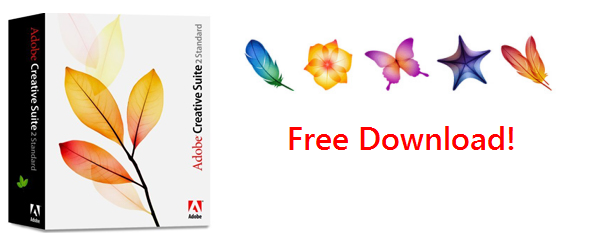
In a surprising move, Adobe has released an older version of some of their most popular products as freeware. The version which can be now downloaded from Adobe’s website free of cost is Creative Suite 2 and includes Photoshop CS2, Illustrator CS2, InDesign CS2 and more. This is great news for those who couldn’t afford to shell out hundreds of dollars for an image editing application, and is definitely bad news for GIMP and the numerous other free Photoshop clones.

Adobe Creative Suite 2 was released in 2005 and is dated compared to the most recent version CS6, but it’s still a powerful piece of software and is by no means inferior.

adobe_cs2-free2

To download them, go to this page, signup for a free Adobe account, if you don’t have one already and download the applications of your choice. The serial numbers for each application are provided on the download page. You can download the entire CS2 Suite or individual applications.

Along with the ever-popular Photoshop CS2 there are an array of applications such as Premiere Pro CS2, Audition 3.0, Acrobat Pro 8.0 etc, all available for free. The complete list of applications that have been made free are:

  • Adobe Creative Suite CS2 (Standard) – contains Adobe Illustrator, Adobe InDesign, and Adobe Photoshop
  • Acrobat 3D 1.0 (Windows) – Create PDF files with embedded 3D images from CAD programs
  • Acrobat Standard 7.0 – Create PDF files
  • Acrobat Pro 8.0 – PDF converter and editor
  • Audition 3.0 - Audio recording and production software
  • GoLive CS2 - WYSIWYG HTML editor and web site management application
  • Illustrator CS2 - Vector graphics editor
  • InCopy CS2 - Word processing software
  • InDesign CS2 - Desktop publishing software
  • Photoshop CS2 – Arguably the best photo editing software
  • Photoshop Elements 4.0/5.0 – Limited feature photo editing software
  • Adobe Premiere Pro 2.0 – Professional video editing software
Read more ...

Windows 8 Media Center Pack is Free Until January 31

For the first time, Windows Media Center, the digital video recorder software from Microsoft, which has always been a part of the Windows operating system will not be included in Windows 8 by default. It will be available as a paid media add-on, for which you’ll have to fork out an additional $10. While ten bucks sounds cheap, when you consider that you are required to run Windows 8 Pro to be able to install the media center pack, the proposition suddenly turns very expensive.

To make Windows 8 as affordable as possible Microsoft is selling the standard Windows 8 license for $39.99 and Windows 8 Pro is on offer at $69.99. But these are discounted prices and available only until January 31, 2013 starting from October 26, 2012. After the end of this period, the price could jump to $199 for Windows 8 Pro.

Microsoft is also knocking off the $10 media pack charge until January 31. If you act now, you can get a license key for Windows 8 Media Center Pack at no cost. It doesn’t matter if you haven’t bought Windows 8 yet. It also doesn’t matter if you haven’t even decided you want to buy Windows 8 or not. Signup for the free media center license now – you can use it latter once you’ve made up your mind.

Simply visit this page and enter you email address. You will receive your license key by email.

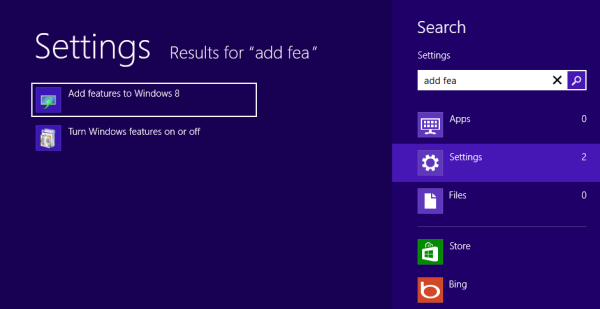
On Windows 8, move the mouse cursor on the lower-right corner of the screen until you see the charms menu. Click on Search.

Choose Settings on the left and type “add features”. Click or touch on Add features.

win8-add-features

In the next window you will be prompted through the steps to buy a product key or enter a procust key you’ve already bought. Choose the second option, enter the key you received in your email and click Next.

win8-add-features2

win8-add-features3

Windows 8 will now commence downloading the media center pack. Once that is installed, you will be able to play DVDs and Blu-ray discs.

Read more ...

Google Play Store Promotion: Apps for 25 cents

Google Play, the premier destination for Android apps, recently clocked 25 billion downloads and to celebrate this milestone the Mountain View company has announced a promotion on Tuesday. During the next 5 days, Google will offer a selection of apps for just 25 cents a piece.

Every day you’ll be able to choose from a collection of apps from some of the world’s top developers including Gameloft, Electronic Arts, Rovio, runtastic, Full Fat and more. And all for just 25 cents. We’ll also be offering some special collections like 25 movies you must own, 25 banned books, 25 albums that changed the world and our 25 top selling magazines, all at special prices.

The first batch of apps is live on the Play Store and can be bought outright for a quarter of a dollar. Most of these apps normally sell between $0.99 and $2.99. One app - Let's Create! Pottery – is priced at $4.99, while OfficeSuite Pro 6+ sells just 1 cent shy of a full $15. All these are available for $0.25.

android25cents

Google is likely to offer a fresh collection of apps tomorrow and another round the next day and so on for the next 5 days, like they did during their 10 cents promotion organized to celebrate 10 billion downloads last December, although many apps were repeated during the last few days.

It took Google more than 3 years to score 10 billion downloads. The last 15 billion came in just 9 months. The next 25 billion will probably come sooner, but will the promotion get any more attractive?

Read more ...

Giveaway: UseNeXT Usenet Accounts

Usenet has been around for more than 30 years but public knowledge about this system is mostly low. When the Internet boom came in the late 90s, Usenet was already on their way out replaced by the World Wide Web and all the fancy things it brought to people’s desktop. Then came Naptser and finally BitTorrent, and Usenet was largely forgotten. Few people who were born during the last two decades have any experience of Usenet. If you are one of them and want to try out a Usenet service but price is the inhibiting factor, here is a chance.

One of the largest Usenet provider UseNeXt has agreed to offer 5 Usenet accounts for Instant Fundas readers. These accounts come with a 50GB transfer limit, meaning you can download up to 50GB of binary content from hundreds of thousands of newsgroups. There is no speed limit and the accounts don’t have an expiry date.

usenext

UseNeXT offers access to over 60,000 newsgroups that contain more than 2500 terabytes of data and 5000 gigabytes are added daily. In UseNeXT’s client program the data is divided into various categories aside from being grouped by newsgroups. You can search for files within a category or within a newsgroup. You can also click on a newsgroup or category and browse files that were recently added and files that were the most downloaded. There are newsgroups catering to movies and music of different genre and tastes such as documentaries, classic TV shows, anime, pro-wrestling, sci-fi, horrors, cartoons and so on.

To download a file, simply right click on the results and select the Download option. You can download up to 30 files concurrently.

As already said, we have 5 UseNeXT accounts to giveaway. If you are interested in entering the giveaway contest, leave your name and a valid email ID in the form below. Winners will be selected by a random draw. The contest closes on September 28, 2012.

Read more ...

Unblock Netflix, Hulu and Other Channels in Your Country With UnoDNS [Giveaway]

unotelly-logoLast week at the Kepard VPN giveaway, nearly one-third of those who participated said they want to use VPN to access geo-restricted websites, such as Hulu, BBC iPlayer and others. Indeed, the most commonly used and functional method to go around country blocks is to connect to a VPN server located in a country where the service is legally accessible. But there is another way to unlock these websites – by spoofing your location by tampering data packets and this is exactly what UnoDNS offers.

UnoDNS is a commercial DNS service that allows non-US residents to enjoy US-based services and programs such as streaming television and online radio. Unlike traditional VPN services that routes all traffic through VPN servers, UnoDNS lets the user connect to the streaming websites directly, for the most part. Only the relevant traffic necessary to trick the remote website into believing you are located in US (or UK) soil goes through UnoDNS servers. These results in no lag or drop in connection speed that even the best VPN service can suffer from.

unodns-channels2

To use UnoDNS all you have to do pick a DNS server that is nearest to your location and use it as your primary DNS server instead of the one supplied by your ISP. UnoDNS provides servers in every corner of the globe from Japan to Australia to South Africa to North America. The location of the DNS server doesn’t affect what content you can access, but can make a huge difference in look-up speed.

Once your DNS servers are configured to use UnoDNS, login to your UnoDNS account and register your IP address. This ensures that only you can access the services you have paid for. If you have additional IP addresses or network, you can add these locations too.

UnoDNS works with practically any device that allows you to change the DNS server, including Xbox 360, Wii, PS3, Apple TV, Google TV and more. Another advantage of UnoDNS over VPN is that most VPN services doesn’t allow you to connect with more than one or two devices simultaneously. With UnoDNS, there is no such restriction. You can run as as many device as you want, provided they are all under the same network when you are using them.

unodns-dns-servers

UnoDNS supports more than 70 video streaming sites the full list of which is available here. The service doesn’t affect any other Internet-based service you have or general web surfing. It only comes into play when you try to access one of the many streaming sites. However, for the sake of security, I’ll advice users to switch on to UnoDNS only when they want to access the restricted sites. When using your email, bank website, PayPal and any other service where security is of utmost importance, switch back to the DNS server offered by your ISP or other trusted sources. I have no reasons to believe that UnoDNS will attempt to spoof your bank website or steal your Gmail password, but services get hacked easily. Ask LinkedIn or Yahoo.

UnoDNS is available in two different price points, ranging from $4.95 per month for Premium to $7.95 per month for Gold. The rates drop further when bought for periods longer than 3 months, and can go as low as $3.99 per month when bought for a year. Gold accounts supports more channels than Premium accounts. History Channel, Nation Geographic, TCM and TMT are among a few that is available only under Gold.

The Gold accounts also come with VPN access that enables customers to avail UnoDNS's service even when connected to networks where the user is not authorized to change DNS servers such as public Wi-Fi or 3G and 4G networks.

As mentioned in the title, we are organizing a giveaway of UnoDNS Gold accounts. We have a few 3-months Gold accounts which we will be giving away to our readers. The giveaway will begin with 3 accounts, but if enough people participate we will add two more free accounts to the lot.

If you wish to enjoy 3 months of trouble free video-on-demand streaming from some of the most popular video (and radio) services, drop your name and email in the form below. Winners will be decided by a random draw. The contest ends on 30 August 2012.

Read more ...

Kepard VPN Accounts Giveaway

How protected are you when surfing the Internet? How often do you expose your sensitive information to spyware or malware? How often does the government see what you’re transferring? If you’re like most people, you really don’t know. The actual answer is pretty stunning – the amount of risk on the modern Internet is staggering. For 10 lucky readers, that won’t be a problem, though, thanks to Kepard’s awesome giveaway.

Kepard is a new VPN service provider that has servers located in 5 different countries: the US, the UK, Germany, Canada and the Netherlands. Additionally, each server has multiple IP addresses and the client program actually allows you to choose your preferred IP address.

Kepard supports all the three major VPN protocols: OpenVPN, L2TP and PPTP. It is possible to use Kepard without installing their client software. L2TP and PPTP protocols are natively supported by Windows. If you want to connect through the more secure OpenVPN protocol and if you already have the OpenVPN software installed then you can simple download the OpenVPN certificates from the website and connect through OpenVPN. However, using Kepard’s own client software is recommended as it allows you to quickly change VPN server locations, VPN protocols and IP addresses.

app5 app4

All Kepard accounts feature unlimited traffic, unrestricted speeds and even allows torrents and P2P downloads. You are also allowed to access Kepard’s services simultaneously on 2 computers.

Generally, people use VPN services either to access geographically restricted services such as Hulu, Pandora, BBC iPlayer and so on, or to remain anonymous in such a way that that their online activities cannot be linked to their true identity. If your primary reason to use Kepard is to protect your identity then you should be aware of their logging practices.

This is what Kepard says about connection logs:

Considering all the frauds happening on the internet we do have to keep logs in order to protect our business from the abuse of using our services. But this should be not a concern for you because we keep the logs just for 3 days. If during this time there are no official complains regarding any illegal activity, the logs containing your IP addresses are automatically deleted. We would like to make clear that no third party can get access to your logs. The reason of keeping the logs is just to protect everybody’s business.

But information in their privacy policy is contradictory:

The way Kepard Applies Collected Data From Kepard VPN Sessions:


This data is preserved for usage with billing, troubleshooting, service offering evaluation, TOS issues, AUP concerns, and for managing violation achieved over the service. We keep this information on a per-session base for a minimum of ninety days. We may continue upload and download bytes at total extended periods of time.

Update: Kepard told me that the 90-days period was an error in their privacy policy, and the actual log retention period is indeed 3 days.

However, Kepard assures us that they “will not provide any personal data - minimal information rationally intended to recognize and no more - or activity information to investigators, attorneys, or agencies in case when we are forced to do it by a court of competent jurisdiction in the domain. If there is a trial in court, the customer will be informed so they will have an occasion to contest the surrender of private information.”

The Giveaway

We have 10 3-months accounts of Kepard Premium VPN for this giveaway. If you are interested in entering the sweepstake, leave your name and email ID in the form below and also tell us what you intend to do with your VPN account. Winners will be selected by a random draw. The contest closes on 21 August, 2012.

Read more ...

Password Recovery Bundle Recovers Passwords from Windows and 50+ Applications [Giveaway]

Have you ever forgotten the password to a computer or an email account or some program you haven’t used for a while? Or maybe you have a PDF file or Word document or a ZIP file but don’t have the password. Rather than having different password recovery tools for different files, here is one password recovery software that rules them all.

Password Recovery Bundle 2012 is a complete suite of password recovery tools that allows you to recover lost or forgotten passwords from all kinds of software and documents easily. Password Recovery Bundle lets you recover or reset passwords for Windows, PDF, Word/Excel/Access, RAR/ZIP, Outlook, Windows Live Mail, Email, FTP, Internet Explorer, Firefox, MSN, AIM, and a whole lot more. It's arguably the most powerful password recovery software in its class.

password-recovery-bundle-

Features:

  • Windows Password Recovery - Instantly reset lost administrator and other account passwords on any Windows 7, 2008, Vista, XP, 2003, 2000 system, if you forgot Windows password and couldn't log into the computer.
  • File Password Recovery - Recover forgotten passwords for PDF, RAR/ZIP, Word / Excel / PowerPoint, PST files.
  • Instant Messenger Password Recovery - Recovers MSN Messenger, Windows Messenger, MSN Explorer, Windows Live Messenger, AIM Pro, AIM 6.x and 7.x, Google Talk, MyspaceIM, Trillian Basic, Trillian Pro, Trillian Astra, Paltalk, Miranda, Digsby, Pidgin, GAIM, EasyWebCam, Camfrog Video Chat, Ipswitch Instant Messaging, etc.
  • Email Password Recovery - Recovers Outlook, Outlook Express, Windows Mail, Windows Live Mail, Hotmail, Gmail, Eudora, Incredimail, Becky! Internet Mail, Phoenix Mail, Ipswitch IMail Server, Reach-a-Mail, Mozilla Thunderbird, Opera Mail, The Bat!, PocoMail, Pegasus Mail and Outlook Personal Folder (PST file) passwords.
  • Product Key Finder - Finds lost product key (CD Key) for Microsoft Windows, Office, SQL Server and Exchange Server and many other products, even if you cannot boot to Windows.
  • Internet Browser Password Recovery - Decrypts and recovers logins and passwords stored by Internet Explorer, Firefox, Opera, Opera Mail, and Google Chrome browser.
  • FTP Password Recovery - Recovers logins and passwords for FTP accounts stored by the most popular FTP clients: CuteFTP, SmartFTP, FileZilla, FlashFXP, WS_FTP, CoreFTP, FTP Control, FTP Navigator, FTP Commander, FTP Voyager, WebDrive, 32bit FTP, SecureFX, AutoFTP, BulletProof FTP, Far Manager, etc.
  • Asterisk Password Recovery - Reveals the hidden passwords on password dialog boxes and web pages, that are covered by the asterisks (*****). It works with almost any of programs.
  • Other Password Recovery - Retrieves passwords for Ipswitch Instant Messaging, Digsby, Total Commander, EasyWebCam, Camfrog Video Chat, Remote Desktop Connection, Dial-up and much more.

Giveaway

Top Password Software, Inc is offering 10 licenses of Password Recovery Bundle Standard Edition for Instant Fundas users, each worth $30. If you are interested in the software leave your real name and email ID in the form below. Winners will be selected by a random draw. The contest closes on 10 August, 2012.

Read more ...

Backup4all Professional Review and Giveaway

Backup4all Professional is a powerful backup software for Windows with a large number of features that will appeal to users who want more out of their backup programs. At the same time, the program is simple enough for the average user to reliably create backup of their data, thanks to the intuitive interface and the short streamlined backup creation process. Backup4all Professional has everything you would expect from backup software such as support for wide range of backup media, different backup modes (full, incremental, differential), file versioning, filters and scheduler.

Backup4all Professional employs a wizard-based approach that guides you through the entire process. The wizard gives you only the basic choices, like selecting the source folder and files, the backup destination (local, network, FTP, SFTP), the type of back and the frequency you want the backup job to run. A number of presets, in the form of plug-ins, let you backup specific programs and the data associated with them like Microsoft Outlook, Mozilla Thunderbird, Firefox profile, Windows Live mail etc.

Backup4all

To access the finer controls of the backup job you have to go into the advanced mode. Here the choices are a bit more complex and varied. You get additional backup destination such as external drive, removable drive or optical media. When burning to optical disks, the program gives you the option to use a third party burning program.

In the advanced mode you can setup filters that let you always exclude or include certain types of files. The filters can be based on file names, file types, file attributes, file size and file creation/modification date. By default, certain files and locations are excluded from backup – the page file, hibernation file, temporary files and folders. One notable feature that’s worth mentioning is that filters can be applied to individual folders and different folders can have different set of filters applied, even if these folders are all part of the same backup job.

Backup4all Professional does four different types of backup: Full, Differential, Incremental and Mirror. Full Backup, as the name suggests, is the complete backup of the contents of the folders that are selected to be backed up. In Differential Backup, only files that have changed since the last full backup are backed up. Incremental Backup stores all files that have changed since the last full, differential or incremental backup. Mirror Backup is identical to a full backup with the exception that the files are not compressed in zip files and they cannot be protected with a password. A mirror backup is most frequently used to create an exact copy of the backup data. It has the benefit that the backup files can also be readily accessed using tools like Windows Explorer.

Other noteworthy features of Backup4all Professional are:

  • Run specific programs before and after performing a backup. You can use this to run a cleanup program like CCleaner before backup starts.
  • Track file versions and selectively restore any previous version of a file.
  • Compress and/or encrypt your backups
  • Detailed report after each backup job completes with options to see files added, deleted, changed etc.
  • Built-in scheduler where you can define backup jobs to run at specific dates and time
  • Automatically delete old backups or restrain backups to specific sizes
  • Send custom emails after a backup finishes, with success, error and warning notifications.

Drawbacks:

  • No disk imaging ability
  • No real-time backups

Giveaway

Backup4all Professional retails at a steep $49.95, but here we have 10 copies of the software that we are going to giveaway to Instant Fundas’ readers. If you are interested leave your real name and email ID in the form below. Winners will be selected by a random draw. The contest closes on 31 July, 2012.

Read more ...

[Giveaway] KeyLemon: Use Your Face as Your Password

Facial recognition software has been around for quite some time. Google's Picasa image organizer has a built in face recognition system that can associate faces with persons. Apple’s photo organizer iPhoto has a similar feature. Facebook also included face recognition technology and the latest version of Windows Live Photo Gallery also included one. So far facial recognition has been used only for convenience purposes, as a mean to automate jobs such as image sorting and identification, but never as a security solution.

Industry leaders are now starting to see biometrics as a viable alternative to passwords. Android 4.0 Ice Cream Sandwich has an optional Face Unlock feature that employs facial recognition software to unlock their phones instead of hassling with the traditional pin codes or pattern unlocks. Apple is also rumored to be working on facial recognition for their Mac operating system. Windows is not likely to have native biometric authentication any time soon; Windows 8 does include a pattern password feature though.

But Switzerland based software company KeyLemon has been offering affordable (and free) biometrics security software for personal computers for the last 5 years. KeyLemon offer a simple and convenient solution for users to login to their Windows computer and other web services using their face instead of a password.

keylemon-login

KeyLemon replaces the standard Windows logon screen with a KeyLemon login screen that connects to the computer’s webcam. Users can automatically login to their Windows computer by simply positioning their face in front of their webcam. If the computer has multiple users the software automatically logs the user into the right Windows account. When the user leaves the computer, KeyLemon automatically locks it and then unlock it when the user is back. When an unauthorized user attempts to login to the computer, their mug shots are recorded and saved for the owner to review.

Under good lighting condition, authentication takes barely a second allowing for quick logins that isn’t possible with tradition password based login. If due to bad lighting or some other reasons, KeyLemon fails to identify the user, the program allows the user to fallback to the default Windows password based login.

KeyLemon has been reported to be easily fooled by a smartphone recording of the face of the user. This is true, but the success or failure of this depends on the trade-off the user made between convenience and security when configuring KeyLemon. The program offers three security level – High, Medium and Low.

keylemon-profile

High security offers maximum security with accurate facial recognition. A high level of correlation is required for authentication which demands adequate lighting. KeyLemon cannot be fooled by a video recording of the user’s face at this security setting. In the Medium security setting, a compromise is made between ease of use and authentication. At this setting, KeyLemon tends to get duped when a video recording of the user’s face is held in front of the webcam. The Low security setting offers the lowest security and should be avoided. At the lowest setting, even a still picture of the user can unlock the computer.

However, to prevent spoofing KeyLemon includes an anti-spoofing technology. When this is enabled, the user is required to blink his or her eyes to unlock the computer. The blinking action also needs to be made at a certain moment when the anti-spoofing icon lights up. This makes spoofing nearly impossible since not only the intruder will need to acquire a video of the user blinking but he or she needs to make sure the whole thing is accurately timed when played back in front of the webcam.

With anti-spoofing enabled, even the Low security level can provide adequate protection that cannot be easily bypassed.

keylemon-plugins

KeyLemon includes several plug-ins that enhances the program features, but unlike traditional plug-ins, they come preinstalled with the software. Currently four such plug-ins are available and they offer a range of interesting features.

The LemonDay plug-in allows one to archive every picture of himself or herself the webcam takes at logon and then stich them together to create a glorious time-lapse video. This is a fun way to track the evolution of one’s face with time.

The LemonLogin plug-in allows one to use themes on the logon screen and personalize it with their own background pictures.

The LemonLock plug-in automatically locks the computer when the owner is not in front of the computer. If an unauthorized person tries to use the computer there is an option to take a picture of them.

LemonFox is another plug-in that installs an add-on in Firefox that enables users to log in to three social-networking services using their Webcam. The supported websites are currently Facebook, Twitter and Linked In.

keylemon-facebook

To login into the social-networking simply open the supported website and KeyLemon will launch authentication. If facial authentication is successful, your login credentials are searched in the login manager of Firefox. If they are not already stored, a window asks you the credentials. Once you’ve entered your login username and password, these are stored in Firefox’s password manager. The next time you open the website, your face will be scanned and only when the authentication succeeds, you will be logged into the website.

KeyLemon comes in three flavors – Basic, Bronze and Gold. Basic is free to use but contains only Windows login with majority of features locked. Bronze contains more features than Basic but still lacks Hijackers Tracking, Security Levels, Anti-spoofing and LemonFox. Bronze is priced at around $20. The Gold version is the complete product and costs twice that of Bronze.

Thanks to KeyLemon, we have 5 Gold licenses to giveaway to our readers. If you are interested in entering this giveaway contest, simply leave your real name and email ID in the form below. Winners will be selected by a random draw. The contest closes on 22 July, 2012.

Read more ...