Showing posts with label Opera. Show all posts

Chrome Extensions & Opera Extension can be install/use in both Chrome and Opera

The latest versions of Chrome and Opera have a lot in common. Google has been hard at work on a new Webkit-based engine that will power them both, and one pleasant side effect is that it's now really easy to install Chrome extensions on Opera, and Opera extensions in Chrome. Here's how to do it.
For this to work, you'll need Opera Next 15 or higher, and Chrome 28 or higher (this also works in dev and beta builds, along with Canary).

Install Chrome Extensions in Opera

To gain access to Chrome extensions from Opera, simply install the Download Chrome Extension in Opera and then visit the Chrome Store and choose the extensions you want to install. You will find that the blue “Add to Chrome” button is now replaced with a red “Add to Opera” button. Click on it to install the Chrome extension in Opera.

Note, that you can only install extensions and not Chrome apps.

Install Opera Extensions in Chrome

Installing Opera extensions in Chrome is also possible, it just requires a little more work to be done.
Start by visiting the page for the Opera extension that you want to install in Chrome in the Opera browser. Now right click over the green “Add to Opera” button and choose the option to save the linked content. This will download the Opera extension as a file having the extension .NEX.


Change the file extension from .NEX to .CRX, the format supported by Chrome.
opera-to-chrome-1

After that, open Chrome and access the Chrome Extensions page (chrome://extensions) and drag and drop the file you downloaded and renamed. This will install the extension.

opera-to-chrome-2


Read more ...

Opera Dumps Own Rendering Engine in Favor of WebKit

Opera Software today announced that the company will switch rendering engine of all their products to WebKit, confirming rumors that broke out when the Norwegian browser maker unveiled a WebKit based browser for Android a few weeks ago. Until now, Opera used their own in-house rendering and JavaScript engines called Presto and Kraken, that were in active development since 1995. These will be replaced by WebKit and V8 JavaScript engine, the same ones used by Chrome.

Opera promises that the change is primarily "under the hood" and that the move won’t affect existing extensions as these can be converted into a format that can be used by Chromium-based Opera. The company is however silent whether this will affect the dozens of other Opera features which are unique to the browser. Features like Mail, RSS reader, Speed Dial, Turbo compression, Mouse gestures, Tab grouping and hundreds of nifty tricks that makes Opera stand apart from the rest of the flock.

As a long time Opera user I’m both elated and apprehensive of the direction Opera is taking. Embracing WebKit would greatly enhance website compatibility, but I’m not sure whether it justifies sacrificing a 20-year old rendering engine and all the features it supports.

The first product using WebKit will be for Smartphones, which we'll demonstrate at Mobile World Congress in Barcelona at the end of the month. Opera Desktop and other products will transition later.

Read more ...

Violent Monkey Improves Greasemonkey Script Support in Opera

Violent Monkey Improves Greasemonkey Script Support in Opera

Greasemonkey is a Firefox extension that allows users to install scripts that make on-the-fly changes to web page content such as change appearance, add new functions to web page, fix rendering bugs, and numerous other modification. Greasemonkey by itself doesn’t do any thing – it’s the scripts that does the actual job. The purpose of Greasemonkey is to help users install and manage user scripts. Since its introduction in 2004, it has become one of the most successful Firefox project with over 2 million users and hundreds, possibly thousands, of user scripts written to date.


Opera introduced user scripts support in version 8, in early 2009, bringing native but limited support for Greasemonkey scripts. Scripts that were written without Firefox-specific functionality work well in Opera, but often this doesn’t happen. Most users scripts were written targeting Firefox and contained several Greasemonkey features. These scripts will often break or entirely refuse to work.

violentmonkey2

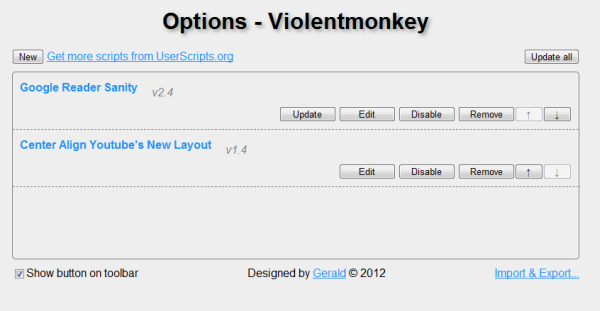
.Violent Monkey is a new extension for Opera that improves Greasemonkey scripts compatibility in the browser giving support for many GreaseMonkey specific features. Violent Monkey lets Opera users quickly install scripts from UserScripts.org using the install button. Without Violent Monkey installed, the button simply opens the scripts as plaintext which you then have to save in Opera’s JavaScript directory. Installed scripts also updates itself whenever new versions become available ensuring that you always have the latest updated scripts in your browser.

You can also edit scripts right inside the browser without opening it in a text editor. Import from and export to raw data string is also available.


violentmonkey

If you haven’t tried user scripts before, install Violent Monkey and checkout some cool scripts at UserScripts.org.
Read more ...

How to Install Opera Extensions from Third Party Websites

OperaOpera has decided to follow suit after Google Chrome regarding protection of users from potentially harmful third-party extensions. In a new blog post, Opera developers explained that starting Opera 12.50, the browser will block installation of extensions that do not originate from the official repository. Opera already alerts users when they try to install extensions outside addons.opera.com, but does not prevent the user from installing the extension. The alert is a mere message that warns the user that the extension is not located on the trusted source. A simple click on the “OK” button is enough to dismiss the alert box and proceed with the installation.

Opera developers now feel that current security measures are not enough.

Having studied how people install and use extensions we came to the conclusion that current security dialog is somewhat deficient, in that many users will simply click-through it and add new repositories to the trusted list, without fully understanding the consequences of such an action.

Starting Opera 12.50, the browser will proactively block installation of extensions from third-party websites. To install extensions from these websites, the user must add them to the list of trusted websites. While this doesn’t actually protect users from malicious extensions from untrusted websites, it does make installation of third-party extensions “require a little more thought”. Users who click “OK” out of habit will now have to pause and think whether they really want to take the risk of trusting an unknown website. The change also eliminates accidental additions.

To add URLs as Trusted Websites, follow these steps:

Click on the Opera button and then click on Preferences. Or just press Ctrl+F12. Move to the Advanced tab and then click on Security. Now click on the Trusted Websites button and add the URLs you wish to whitelist.

Once a URL has been added to the list of trusted websites, Opera will no longer prevent users from installing extensions from the site.

The new behavior has already been implemented on Opera Next 12.50.

opera-security

Read more ...

Opera 12 Released

After nearly a year in development, the final build of Opera 12 has just been released with numerous changes focusing mostly on performance, stability and faster browsing. To improve performance, several steps were taken such as plugins are now handled as separate processes, which means even if a plugin such as Flash behaves errantly, it won’t take the whole browser down. Underused features such as Unite and Voice are removed. Opera 12 also received a significant speed boost with faster page loading, faster start up and faster HTML5 rendering, hardware acceleration and a new skinning engine similar to Google Chrome and Firefox persona.

In brief here are the new features in Opera 12.

Support for hardware acceleration has been implemented, which means you can use the computer’s graphics processor to render pages, animations and even the UI of the browser itself, faster and more smoothly. Hardware acceleration is disabled by default, however. You can enable this feature by setting opera:config#UserPrefs|EnableHardwareAcceleration to 1, then saving and restarting Opera.

opera12-ha

Web-GL support: Opera 12 allows users to switch to WebGL engine instead of Opera’s default Presto rendering engine. This means that pages that doesn’t play well with Opera but renders correctly in Chrome will now open without problems in Opera 12. This optional WebGL is also disabled by default and can be enabled by setting opera:config#UserPrefs|EnableWebGL to 1, then saving and restarting Opera.

opera12-webgl

Separate process for plugins: The other important change in Opera 12 is that plug-ins like Flash and QuickTime now run in separate process. As already explained, this improves browser stability.

New Themes: Opera 12 brings a new theming engine to the browser, offering a simple way to change the look and feel of the software. Traditional Opera skins are still supported.

opera12-themes2opera12-themes3

Webcam support: Opera 12 now supports capturing webcam images directly through the browser using HTML5. Several photo applications like Photo Booth, Polaroid and Facekat has been integrated within the browser for hilarity and awesomeness.

64-bit Opera: Opera 12 also debuts 64-bit version of the browser for Mac and Windows.

Opera 12 also added support for five new languages - Arabic, Persian, Urdu, Hebrew and Kazakh — now bringing the total number to 60 for the browser. The ability to add right-to-left reading for Arabic, Persian, Urdu and Hebrew throws the door open for potentially millions of Internet users.

Unfortunately, Opera did let go two add-on platforms Widgets and Unite in favor of Extensions. Also phased out were speech recognition, text-to-speech and VoiceXML. This is disappointing for those users who have grown used to these tools.

Read more ...