Showing posts with label Internet. Show all posts

Microsoft Adds OCR Recognition for Images on SkyDrive

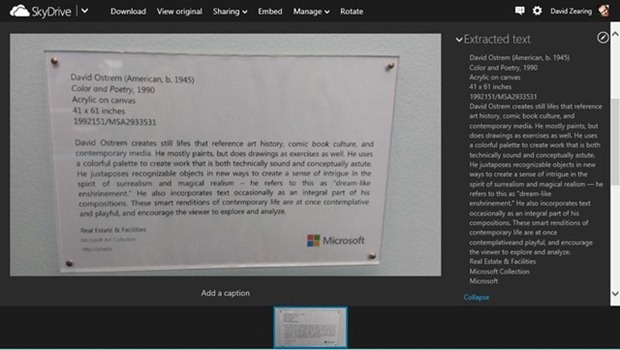
Following the footsteps of Google, Microsoft has added optical character recognition (OCR) to images stored on its SkyDrive cloud storage service. With this new SkyDrive update, the online OCR tool powered by Bing will automatically run on photos that you send to SkyDrive so you can instantly see the extracted text whenever you view your photos on SkyDrive.com.

“When you take photos with your Windows Phone (with auto-upload turned on) today, we send them to your SkyDrive camera roll folder. With this new SkyDrive release, our OCR tool will automatically run on your camera roll photos so you can instantly see the extracted text whenever you view your photos on SkyDrive.com,” Microsoft wrote in a blog post.

skydrive-ocr

The text will be shown in the interface for viewing the images within SkyDrive, and can be copied and pasted elsewhere.
This feature can be useful when people use camera phones to take photos of signs, maps, business cards, or other textual subjects they might want to refer to later. The OCR tool is currently available in English, Portuguese, Spanish, French, and German, and should have been rolled out to all users by now.
Read more ...

List of Things You Can Get for Free With a .EDU Email ID

One of the perks of being a student is the ability to get student discounts. Many retailers offer handsome rebates on products such as clothing, magazine subscription, movie and flight tickets, insurance and of course, software. Some service related industries and software companies in particular give one hundred percent rebates on their products. In this article, we will focus only on those products. Those who are interested in all types of student discounts, a simple search for “student discounts” on your favorite search engine will reveal plenty of offers.

To be eligible for student discounts, sometimes all you need is a .edu email address provided to you by your university or college. If you have one and it still hasn’t expired, give yourself a shot at these freebies.

Microsoft DreamSpark

dreamspark
DreamSpark is a Microsoft program to provide students with Microsoft software at no charge. The program was originally available for university/college students in Belarus, Belgium, China, Finland, France, Germany, India, Italy, the Netherlands, Spain, Sweden, Switzerland, Tunisia, the U.K. and the U.S., but has now been expanded to more than 80 countries and is offered to many high school students. To register, students must visit the DreamSpark website and verify their identity. If an institution is not listed on the available list, the user may manually verify their student status by uploading a proof such as an ID card.
Software that are available for free download through the DreamSpark program include multiple editions of Visual Studio, Expression Studio, Microsoft SQL Server, Windows Server, and Windows Embedded. DreamSpark also offers waiver on Windows Marketplace and Windows Store, and from time to time, announces discount on flagship products such as Microsoft Office and Windows.

Autodesk

autodesk
Autodesk is terribly philanthropic towards students. Under their students program, the software company gives away practically everything they own, which includes:
AutoCAD for Mac
Autodesk 3ds Max
Autodesk 3ds Max Design
Autodesk Alias Automotive
Autodesk Alias Design
Autodesk AutoCAD
Autodesk AutoCAD Architecture
Autodesk AutoCAD Civil 3D
Autodesk AutoCAD Electrical
Autodesk AutoCAD Map 3D
Autodesk AutoCAD Mechanical
Autodesk AutoCAD MEP
Autodesk AutoCAD P and ID
Autodesk AutoCAD Plant 3D
Autodesk AutoCAD Raster Design
Autodesk AutoCAD Structural Detailing
Autodesk Ecotect Analysis
Autodesk Fusion 360
Autodesk Green Building Studio
Autodesk Impression
Autodesk InfraWorks
Autodesk Inventor Professional
Autodesk Inventor Publisher
Autodesk Maya
Autodesk MotionBuilder
Autodesk Mudbox
Autodesk Navisworks Manage
Autodesk Quantity Takeoff
Autodesk Revit
Autodesk Revit Architecture
Autodesk Revit MEP
Autodesk Revit Structure
Autodesk Robot Structural Analysis Professional
Autodesk Showcase
Autodesk Sim 360
Autodesk Sim 360 Pro
Autodesk Simulation CFD
Autodesk Simulation Mechanical
Autodesk Simulation Moldflow Adviser Ultimate
Autodesk Simulation Multiphysics
Autodesk Smoke
Autodesk Softimage
Autodesk T_Splines Plug_in for Rhino
Autodesk tsElements Plug_in
Autodesk Vault Basic Server
Autodesk VRED Professional

Amazon Prime

amazon
Amazon Prime is a service under which the online retail giant offers free two-day shipping on all eligible purchases, as well as discounted one-day shipping rates, instant streaming of thousands of movies and TV shows with Prime Instant Video, borrow Kindle books for free reading and other benefits, for a flat annual fee (currently $79/year).
For students, Amazon offers this service free for 6 months after which they get a 50% discount.

LastPass Password Manager

LastPass Password Manager is an online password management service, and is available as a plugin for Internet Explorer, Mozilla Firefox, Google Chrome, Opera, and Safari. The basic service of LastPass is free, which includes one-click login, form filling and cross-browser synchronization. Under Premium subscription, one gets the ability to import and export data, backup and restore, stronger passwords and more.
Those having a .edu email ID can get LastPass Premium for 6 months.

The Washington Post

Founded in 1877, The Washington Post is one of the oldest and most widely circulated newspapers in the United States of America. The newspaper offers free digital subscription to anyone with a valid .edu, as well as, .gov and .mil email address.

WestHost

WestHost offers students with a .edu email ID, free webhosting for a year.

ZW3D

ZW3D is all-in-one, CAD/CAM software, which enables concept to finished product design in an integrated, collaborative environment. Supported by its Show-n-Tell built-in learning system, ZW3D includes data exchange to allow efficient reuse and sharing of designs, hybrid modeling with its unique Overdrive kernel, mold and die design with cavity preparation tools and component libraries, and intelligent, adaptive CNC machining from 2-axis through to 5-axis.
Students are offered free 12-month licenses.

Prezi

Prezi is a cloud-based presentation software, not unlike Microsoft PowerPoint, and storytelling tool for presenting ideas on a virtual canvas. The product employs a Zooming User Interface (ZUI), which allows users to zoom in and out of their presentation media, and allows users to display and navigate through information within 3D space.
Prezi can be used by teachers and students to collaborate on presentations with multiple users having access and the ability to edit the same presentation. At no extra cost, students can remove the Prezi logoi and replace with their own and also get 500MB of storage space.

GitHub

GitHub is a web-based hosting service for software development projects that use the Git revision control system. GitHub offers both paid plans for private repositories, and free accounts for open source projects.
GitHub offers Educational Accounts for academic people (student, teacher, etc.) for 2 years that includes 5 repositories. These plans usually cost between $7/month and $22/month.

Lucidchart

Lucidchart is a web-based diagramming software which allows users to collaborate and work together in real time to create flowcharts, organizational charts, website wireframes, UML designs, mind maps, software prototypes, and many other diagram types. Built on web standards such as HTML5 and JavaScript, Lucidchart is supported in all modern web browsers like Google Chrome, Firefox, Safari and Internet Explorer 8+.
Lucidchart offers Educational accounts, which are equivalent to Pro accounts, to all students having .edu, .ac.* and .k12.*.us email IDs for free.
Read more ...

RSS Feed Reader ‘The Old Reader’ Closes its Doors

When Google Reader closed shop, a bunch of alternatives popped up over the next few months. A few of them that existed before Google decided to terminate the service, welcomed the decision and worked hard to pick up the slack. Feedly gained the most with 8 million new users signing up for the service, as of June 2013, while another smaller startup - The Old Reader – reportedly added 350,000 new users following the shutdown announcement. Unfortunately, the sudden and unexpected influx of Google Reader refugees was too much for the modest servers of ‘The Old Reader’ to handle, as the team behind the simple RSS reader struggled to balance their work and personal life. In the end, they had to make a decision.

theoldreader

Today, the team announced in a blog post, that they are giving up development on the product because they're simply exhausted from building it. The web app will no longer accept new users, and in two weeks, The Old Reader will turn into a private site for those who've registered before March 13th. If you're an Old Reader user who signed up after March 13th, you will need to download your data and move to another product.

“We’d rather provide a smooth and awesome experience for 10,000 users than a crappy one for 420,000,” wrote Elena Bulygina and Dmitry Krasnoukhov, the site’s operators.

“The truth is, during last 5 months we have had no work life balance at all. The “life” variable was out of equation: you can limit hours, make up rules on time management, but this isn’t going to work if you’re running a project for hundreds of thousands of people. Let me tell you why: it tears us to bits if something is not working right, and we are doing everything we can to fix that. We can’t ignore an error message, a broken RAID array, or unanswered email. I personally spent my own first wedding anniversary fixing the migration last Sunday. Talk about “laid back” attitude now. And I won’t even start describing enormous sentimental attachment to The Old Reader that we have.”

“We have been sleep deprived for 10 days and this impacts us way too much,” they wrote.

“That’s why The Old Reader has to change. We have closed user registration, and we plan to shut the public site down in two weeks. We started working on this project for ourselves and our friends, and we use The Old Reader on a daily basis, so we will launch a separate private site that will keep running. It will have faster refresh rate, more posts per feed, and properly working full-text search — we are sure that we can provide all this at a smaller scale without that much drama, just like we were doing before March.”

The sad demise of The Old Reader is a lesson for all – both startup developers and users. If you can’t scale well to an increasing user base, your product is a failure, which is what happened to The Old Reader. For users, it’s time to reassess the services they are relying on. Is the service profitable to the operators? Is it run by a small team or backed by corporations or huge donations from capitalists? Will the service exist 3 years from now? Two years? One year?

Where to Go: Forget the run-of-the-mill RSS feeds readers that have been popping all over the web, and stick to reliable ones. Currently, there are only three RSS readers that can be called trustworthy. They are Feedly, Digg Reader and AOL Reader.

Among these three, I like AOL Reader the best – it has good features, has a nice polished interface and doesn’t look like a beta product. Digg Reader is trying hard to be a good one, but somehow its failing to impress me. Feedly has a certain attraction and is currently the only one that provides an API so that other feed readers can build apps based on the service. It is already the most popular RSS reader app.

Read more ...

Add the ‘Stop Download’ Option Back to YouTube

About a month ago, Google removed the ‘Stop Download’ option from YouTube that allowed users to instantly stop download and buffering of a video. This option was available in the context menu when a user right-clicked over the YouTube video player. You may have noticed it or you may have not, depending on whether you used that option. Many did, and it was sorely missed.

Google removed it in favor of the Pause button that is already present in the video player. When you pause a video, it buffers partially and then stops buffering until you play the video again. This is different from the ‘stop download’ option that used to stop video buffering instantly. With the pause button, video buffering will continue for some time after you have clicked the button. This is a problem for those users with slow internet connection, when more important downloads are in progress.

The workaround to the missing ‘stop download’ feature will be to close the page entirely to prevent the video player from sucking on valuable bandwidth. However, you may not want to close the page because you want to watch the video later.

Now a userscript has been created that beings back the removed feature.

How to Stop Downloading YouTube Video

Method 1 – Using a Bookmarklet. This is the easiest way because the bookmarklet works with all browsers. To use it, simply drag and drop the linked bookmarklet to your Bookmarks toolbar. To stop a YouTube video while watching, just click on the bookmarklet and your video will stop right there.

Method 2 – Using a Userscript. The userscript adds a Stop Video button on the YouTube interface. Unlike the original ‘stop download’ button on the right-click menu, the ‘Stop Video’ button appears next to the Subscribe button under the video player. Clicking on it stops the video from downloading.

stop-youtube-video

Firefox users, install the Greasemonkey add-on and then install the userscript.

Chrome users, install the TamperMonkey extension and then install the userscript. TamperMonkey improves Chrome's userscript compatibility allowing you to use Greasemonkey userscripts on Chrome.

Opera users, install ViolentMonkey extension and then the userscript. ViolentMonkey improves Greasemonkey scripts compatibility in the browser allowing users install scripts from UserScripts.org using the install button.

via Webtrickz

Read more ...

Request Your Yahoo Username Now

Last month Yahoo announced that they will reset accounts that were inactive for more than a year, so that they could free up usernames for new users to pick up. The company has started the ball rolling. Last Monday, all dormant Yahoo accounts were reset. Immediately after, the company opened up a wish list allowing users to request username they’d like to own, before actually letting people get hold of these names. Users can request up to 5 usernames, in order of preference. If the first choice isn’t available, Yahoo will try one of the backups. Then in mid-August, users who filled the wish list will get an email letting them know which of their picks is available, with a link to claim it within 48 hours.

Request your Yahoo username here.


You may remember, when the decision to reset accounts and make registered usernames once again available to the public was announced, I expressed concern over the issue of privacy and security. Yahoo attempts to minimize the damage by providing a way for e-commerce and social networking sites to identify whether the user is the new owner of a Yahoo username, or the previous owner.
Yahoo seeks to do this by allowing sites to “ask” for a new type of validation when sending an email to a specific Yahoo! user. The field, which can be requested via an email’s header is called “Require-Recipient-Valid-Since.”
If a Facebook user with a Yahoo! email account submits a request to reset their password, Facebook would add the Require-Recipient-Valid-Since header to the reset email, and the new header would signal to Yahoo! to check the age of the account before delivering the mail. Facebook users typically confirm their email when they sign up for the service or add new emails to their account, and if the “last confirmed” date that Facebook specifies in the Require-Recipient-Valid-Since header is before the date of the new Yahoo! username ownership, then the email will not be delivered and will instead bounce back to Facebook, who will then contact the user by other means.
Facebook will implement the new authentication method, so new owners of an old Yahoo username can’t possibly log into the previous owner’s Facebook account. Yahoo intends to partner with more sites so that they could adopt the new authentication method.
Read more ...

How to Remove Profanity, Swear Words or Foul Language From Webpages

Foul language, swearing, cursing, cussing and bad words in general are commonly seen on the web. Just go to any website and read the comments at the end of an article, or visit YouTube or any discussion board or social networking site and you will almost always come across vile postings full of hate and hostility and lack of respect in general. If you hate profanity and want to get rid of them from your browser, either for yourself or to create a friendly environment for your kids, this article will guide you how and from where to begin.

Filter Profanity by Keywords

The best way to remove profanity on the web is to filter them using a blacklist of known bad words. In Chrome, you can install the Simple Profanity Filter that replaces user defined words with asterisks such as ****. You can configure the filter to show the first character of the blocked word and hid the rest, in case you are curious what the blocked word is. For instance, a filtered word will show up as F****.

The extension comes pre-installed with a small selection of cuss words that should do the job initially. You can make the filter more effective by adding your own keywords.

simple-profanity-filter-

Firefox has one of the best profanity filters made for browsers - ProCon Latte Content Filter, which can be used not only to censor inappropriate language but restrict access to websites that contain questionable content. When ProCon Latte detects objectionable words on a webpage, it blocks the page and displays a notification. You can then allow Firefox to display the page temporarily or add the domain to the whitelist to prevent ProCon Latte from blocking the page in future. Once the page loads, ProCon Latte will filter swear words and replace them with garbage characters such as !@#$%^&* (this can be changed in the options page).

procon-latte

You can disable Content Blocking altogether, and stick to only Profanity Blocking. This way, webpages are not blocked but profanity is censored. ProCon Latte supports blacklist, block websites list, and whitelist.

If you love Greasemonkey scripts, install the Profanity Filter userscript. The Profanity Filter will block objectionable words based on a list of keywords and replace them with asterisks. The script comes with a large selection of keywords and you can add or remove them by directly editing the script.

If you want to take web cleansing a step further, install tinyFilter for Chrome. Rather than hiding the bad words, this extension disables access to the entire webpage. This is the default behavior and can be easily overridden by disabling “content blocking” from the extension’s option page. Doing so will change tinyFilter to a less aggressive profanity filter. tinyFilter is also based on keywords and comes with a self-updating blacklist. You can also add your own keywords.

tinyfilter

tinyFilter’s content blocking is useful when you want to block pornographic material and adult websites. Pages can be blocked by URL too.

Remove Comments Containing Profanity

Since the source of all foul language on the web is user-generated content, mostly comments, you can leave the articles alone and target only on offensive comments.

Comment Snob for Firefox and Chrome hides undesirable comments from the web based on the following rules:

  • Number of spelling mistakes
  • All capital letters
  • No capital letters
  • Doesn't start with a capital letter
  • Excessive punctuation
  • Excessive capitalization
  • Profanity
  • Filtering on custom words and phrases

You can choose which rules you want to enforce.

comment-snob

Blocked comments are hidden under a collapsible section. A click on the Show link reveals the hidden comment.

Comment Snob comes with support for YouTube by default, but you can add support for many other sites by installing Comment Snob rules for Yahoo! News, Break.com, Mashable, Hacker News, Fark and Reddit.

CommentBlocker for Chrome goes one step further and hides all comments on all websites regardless of whether they contain profanities or not. The extension hides the entire comments section under an overlay, but if you wish to see them you only have to click on the overlay once.

The identically named (but from different developers) CommentBlocker for Firefox functions just like its Chrome counterpart - it blocks all comments. When comments get blocked an icon appears inside the address bar which you can click to toggle the comments on and off. There is support for blacklist and whitelist for websites, letting you decide what to filter out and what not to.

Do you get bothered by foul language? How do you manage or react when you encounter them on the web?

Read more ...

BitTorrent SoShare: A Hybrid File Sharing Service

BitTorrent Inc., the company behind the popular file-sharing clients BitTorrent and uTorrent – after the recent acquisition, launched a new file-sharing service today. Called SoShare, the new platform uses a technology that is a hybrid between BitTorrent and traditional server based storage allowing users to send files up to one terabyte in size while utilizing the bandwidth sharing abilities of the BitTorrent protocol.

SoShare lets users upload and share files as they do with other file sharing services, but the transfer is boosted using BitTorrent technology. When a user uploads a file to SoShare, a master copy is saved on to the cloud from which others can download regardless of whether the uploader is online or not. So far, this is identical to server-based file hosting/sharing service. But as more people have access to the file, the available bandwidth is increased allowing faster download of the file while also reducing load on the central server.

soshare-sent-details-page

To add the BitTorrent functionality, SoShare users have to install a browser plugin. Once the plugin is installed users can upload files and share these privately via email or a public link. Recipients don’t need an account to download the files, but do need the SoShare plugin.

The biggest advantage of SoShare over other file sharing services is the gigantic amount of data that can be shared through it – up to 1 terabyte. Files live for 30 days but you can make them expire sooner.

“We’re focused on sending, not locker storage, so the workflow is pretty straightforward. Again, we identified a need for the creative community during the alpha and that is what SoShare aims to address,” told Catherine Meek, Director of Product Management at BitTorrent, to Torrent Freak.

Currently there are no paid plans of any, but the company will be “looking at a few options along the way”.

The SoShare plugin works Chrome, Firefox and Safari on Mac, and Chrome, Firefox and Internet Explorer on Windows. At this time, there is no support for Linux.

Read more ...

Google Takout Now Allows Export of Blogger and Google+ Pages

Google Takeout, the service that allows Google users to export and download their data from various Google products on to their computer, has just added support for two new products. Starting today, you will be able to download your Blogger blogs and Google+ Pages in a variety of formats. Google Takeout was launched in mid-2011 and initially allowed users to export their data from 5 Google products. The service has since expanded to cover a number of Google products and services including YouTube, Picasa Web Albums, Google Contacts, Drive, Google+ Streams, Circles and +1’s and more.

google-takeout-blogger

Data from your Blogger blogs are offered as Atom XML files, while Google+ Pages are split out into two different formats - html files with posts to your page and json files with the circles that your page is a part of. You can download all your Blogger blogs at once or do it one at a time.

It should be noted that Blogger already allows users to export their blog through the Blogger dashboard. Blogger’s addition to Takeout is simply a consolidation of the data exporting abilities offered by Google.

via Data Liberation Blog and TheNextWeb

Read more ...

Think Your Friend’s Gmail Account Was Hacked? Report to Google

Almost two years ago, Microsoft introduced a feature that allowed friends to report hacked Hotmail accounts directly to the company. When someone’s email account gets hacked, it’s usually the friends who start noticing unusual activity. It starts with spam messages with extraordinary stories of their friend stranded abroad with no cash. Will they wire some money to a strange address, please? It’s an old trick and is surprisingly effective. A Hotmail user could report such emails by selecting an option called “My friend’s been hacked!” from the “Mark as” button. This sends an alert to Microsoft. The attacker is blocked from accessing the account, and then the real user can start the account recovery process.

Recently, Lifehacker writer Adam Pash stumbled upon a not very well known feature on Gmail that seems to have been inspired from Hotmail.

If you start receiving spam from your contacts, you can mark the email as suspicious. Doing thus will mark the message as ‘sent from a compromised account’, and a report will be sent to the Gmail team. Your contact's account will not be penalized and you'll continue to receive messages from this account in the future. Reporting accounts will help Google improve their detection of compromised accounts, but whether or not it will allow the victim to recover their account is not very clear.

This option is available when you click on the “Spam” button at the top of the email.

spam

If the sender is one of your contacts, you will see an alert box like the one shown below.

suspicious-message

If you believe that the message is not a scam or malicious but you simply did not want to receive it, click on “Message is just spam” instead to mark it as as spam and to make the alert disappear.

Do note that you can report suspicious accounts only when the sender is in your Gmail contact list. If the sender is not in your contact list, clicking the “Spam” button simply removes the message from your inbox and into the spam folder.

Read more ...

Amazon International Price Comparison

Amazon, the world’s largest online retailer, has warehouses across North America, Latin America, Europe, Africa, and Asia, and separate retail websites for United States, Canada, United Kingdom, France, Germany, Italy, Spain, Brazil, Japan, and China. These different versions of Amazon often have the same products on sale but at varying prices.

For those buyers who live in the above mentioned 10 countries it is always cheaper to buy from that region’s Amazon website because the products can be shipped from locally available warehouses. But for international buyers, it might not always be cheaper to buy from the closest Amazon center. For instance, if you live in Sweden, should you buy from Amazon UK or Amazon Germany? If you compare the prices and take into account the shipping costs, you may find that the answer is neither, and you may even discover that you can spend less if you order the product from Amazon US across the Atlantic.

There is a new extension for Chrome and Firefox that lets you make price comparison of products on sale across different Amazon centers. In the example below, you can see that the Nikon external flash SB-700 is £8.1 cheaper at Amazon.com (US) and £16.4 cheaper at Amazon.ca (Canada) as compared to the prices at Amazon.co.uk. You can also see prices of used items, whenever available.

amazon-int-price-comparison

Shipping costs are not accounted for, but I’m willing to bet a UK customer can save a few pounds if he or she orders this particular item from Canada.

The table is automatically embedded in the product page, by the extension, once the page finishes loading. You don’t have to click any button.

Also notice that the prices are automatically converted to local currency – Great Britain Pound in this case, so the price comparison is even easier. The extension works across all Amazon websites. If you visit Amazon.com, the prices will be converted to US Dollars; if you visit Amazon.jp you will see the prices in Yen.

If you do a lot of international shopping at Amazon, this extension can help you save a few bucks.

Read more ...

Own a Nikon Camera? Get Free 20GB Storage at 'Nikon Image Space’ Image Sharing Service

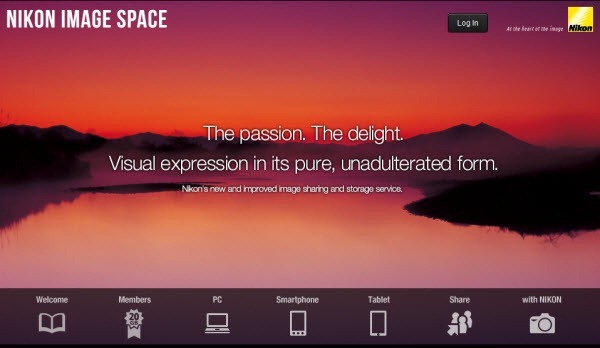
Japanese camera manufacturer Nikon Corporation has just launched a new image sharing and storage service called 'Nikon Image Space’ that is open not only to users of Nikon digital cameras, but anyone who enjoys taking photos and sharing them. While everyone gets 2GB of storage space for free, if you own a Nikon camera you can convert your Basic account to Special account and your storage will be increased to 20GB. You can also utilize several advanced functions, including the ability to apply a password when sharing images, and a function that restricts image download.

In order to upgrade your account, you will need to download this utility and connect your Nikon camera to your computer using the provided USB cable.

nikon-image-space

An advantage of using Nikon Image Space over other image sharing services is the ability to restrict viewers from downloading your images. Nikon Image Space is a Flash based website, so there is no direct link to any of the images hosted in your account. You can also create password protected albums that can only be viewed by people who have the correct password. These features are available only on Special accounts, that you can get if you have a Nikon camera.

Another great thing about Nikon Image Space is that the service supports NEF and NRW data (RAW files), in addition to JPEG data. Special accounts supports images up to 1920×1080 in size.

To upload pictures, Nikon provides an Adobe AIR based upload utility that supports drag-and-drop method of file upload, and can upload up to 2000 images simultaneously.

Basic features

Uploading and downloading photos

  • Upload and store original photo data without having to trim, shrink, compress, or otherwise process the data.
  • Download original photo data or select a specific size for download.

Viewing photos

  • View photos in a user-friendly interface designed with easy viewability and navigation in mind.
  • Display photos in their original size (dot-by-dot).
  • Select from four viewing modes: Grid View, List View, Carousel View, and Map View.
  • Play back Nikon Motion Snapshot (NMS) files.

Organizing photos

  • Use drag and drop operations for more direct management.
  • Automatically sort photos by category (i.e., shooting date, upload date, camera).
  • Change the sort order by category.
  • Change the sort order based on photo information (e.g., file name, shutter speed, aperture value).
  • Search for photos by shooting date, rating, tags, etc.
  • Group photos into albums.
  • Group albums into boxes.

Sharing photos

  • Share album photos and videos in a guest page.
  • Customize the guest page (e.g., design and share settings).
  • Generate guest page URLs.
  • Send sharing invitations via email.
  • Share photos on Facebook and Twitter.

Linking with other devices

  • View, edit, and store photos and settings using the iOS or Android application.
  • Display photos on the mobile site.
Read more ...

How to Send a Facebook Message to Anyone For Free

Recently Facebook started experimenting with new ways users could send messages to each other, while cutting spam and making a few bucks in the process. Previously users set their inbox to allow messages from either everyone or friends of friends, or friends only. Anyone else that didn’t qualify had their messaged dumped to the “Other inbox” that most people rarely checked. There are many instances where important messages from people remained unread for months or even years in the other inbox because they weren’t friends or friends of friends. So last month Facebook started testing a new paid messaging system where strangers could pay $1 and be guaranteed that the message will be delivered to the recipient's inbox.

The idea is that by letting people pay a small fee, Facebook knows a message is important to the sender. The price will also deter spam because spammers and advertisers will be less willing to spend on messages because conversion rates on spam messages are very low.

But blogger Lukas Klein has discovered a loophole that allows anybody to send a message to another's inbox, without paying anything. The hack works by using the 'Report' feature.

The first step is to go to the person’s profile and click on 'Report/Block...'.

facebook-spam-01

You will be presented with a few options. Choose 'Submit a Report' and then 'Report …. account'

facebook-spam-02

In the next screen, choose 'This timeline is using a fake name'.

facebook-spam-03

A message box will appear with a prepopulated text that asks the person to change their name, but you can change it to whatever you want. This message will go directly to the other user's inbox, no matter what filter-preferences are in place.

facebook-spam-04

Facebook hasn't responded to the hack, but if enough people start abusing it, it’s likely to get fixed.

via HackerNews

Read more ...

List of Online Malware Scanning Services

List of Online Malware Scanning Services

If you have downloaded a file that you aren’t sure is safe or malicious, you can have it scanned locally on your computer using your existing antivirus or anti malware programs. You probably have one or two or maybe even three such scanners at most, and except one single resident, real-time scanner, others are likely to be demand only since no two real-time scanners can exist together without killing each other and the system it resides on. This is why online malware scanning services are so handy, because it allows you to scan files with multiple scanners without installing any of them locally on your computer. Let us look at some of the online malware scanning services at our disposal.

online-malware-scanners

Malware Scanners Aggregator

VirusTotal – Possibly the most popular online virus scanner out there. Now a subsidiary of Google, VirusTotal aggregates more than 40 anti-virus vendors and their malware scanner and 40 URL scanners to analyze files and URLs submitted by users for detection of viruses, worms, trojans and other kinds of malicious content. The maximum file size that users can upload is 32 MB. Files can be uploaded either through the web interface or through a desktop program.
Jotti's malware scan – Another aggregate service that scans uploaded files by 20 (at the time of this writing) malware scanners. Maximum upload file size is 25 MB. Files has to be uploaded via the web browser. If you are looking for a convenient desktop program to upload files, try JottiQ.
VirSCAN.org – The third aggregator malware scanning service checks files against 37 antivirus scanners. Maximum upload file size is 20 MB.
Metascan Online – Over 40 anti virus scanners are available under Metascan Online, and maximum upload file size is 40 MB. Metascan is also available as a server application with a local and network programming interface that allows administrators to setup a Metascan Online type of malware scanning service locally for their customers.
UploadMalware – This site allows users to submit up to 6 files at once for analysis by 50 antivirus software. You have to leave your email ID, where you will be contacted when the scanning is done and the results available.

Standalone Malware Scanners

Anubis – This is a malware behavior analysis service, where submitted files are run in an emulated environment and the execution is analyzed for security-relevant aspects of a program's actions. Anubis is not really intended for end-users, rather malware and virus interested person to get a quick understanding of the purpose of an unknown binary.
Comodo Instant Malware Analysis – An automated malware scanner run by security products vendor Comodo.
Comodo Valkyrie – Another cloud based file analysis service from Comodo that tests user-submitted files with a range of static and dynamic detectors - including heuristics, file look-up and real-time behavior analysis. Maximum upload file size is 20 MB.
GFI SandBox – Automated malware analysis service that analyzes files for potential threats within a controlled environment. Results of analysis are sent to email.
EUREKA Malware Analysis - Eureka is a binary static analysis preparation framework that implements a novel binary unpacking strategy based on statistical bigram analysis and coarse-grained execution tracing. Eureka incorporates advanced API deobfuscation capabilities to facilitate the structural analysis of the underlying malware logic. For each uploaded binary, the Eureka service will attempt to unpack and (for Eureka I, disassemble; for Eureka II (not yet available), decompile) the binary, and will produce an annotated callgraph, subroutine/data index page, strings summary, and a list of embedded DNS entries.
(I didn’t understand any of the above, but apparently, it’s a sophisticated malware analysis service. But maximum upload file size is a paltry 5 MB.)
ThreatExpert - An automated threat analysis system designed to analyze and report the behavior of computer viruses, worms, trojans, adware, spyware, and other security-related risks in a fully automated mode. Maximum upload file size is 5 MB.
Vicheck.ca - An advanced malware detection engine designed to decrypt and extract malicious executables from common document formats such as MS Office Word, Powerpoint, Excel, Access, or Adobe PDF documents. Users can submit up to 5 files at once but the total size of all uploaded files shouldn’t be more than 10 MB.
F-Secure Sample Analysis Service is run by the security products vendor F-secure. Maximum upload file size is 10 MB.
Avira Online Analysis – You can submit multiple files to Avira for analysis using a drag-and-drop web interface.
Avast! Online scanner – Lets you scan files using Avast’s malware scanner of files up to 16 MB in size.
NoVirusThanks Online AntiVirus Scanner - Free service that allows users to upload and analyze a file with multiple Antivirus engines to help the detection of possible dangerous and infected files. Users can also analyze a website URL or a remote file with the option Scan Web Address. Maximum upload file size is 20 MB.
Know any other good malware scanners that should be in the list? Tell us.
Read more ...

Chrome Extension to Easily Unsubscribe From Newsletters in Gmail

I signup on lots of websites to try out new web apps and other stuff, and more often than not, end up on their mailing list. Everyday these sites send me scores of emails that goes straight to trash. I skim through the subject lines in my inbox, select the ones I do not need and delete them. Since I never open any of these mails, I’ve never had a chance to unsubscribe from them. This had become a daily ritual until one day I decided to unsubscribe from each and every one of these unsolicited correspondence.

I used a little trick I learned sometime ago: I searched for the words “unsubscribe” and bam! Gmail showed me all newsletters that had an option to unsubscribe. I opened each email, hunted for the unsubscribe link - that is usually located at the bottom of the mail and printed with the smallest possible font – clicked on it followed the procedure. It was time consuming and tiring, but since the clean-up I get fewer newsletters than I did before.

Today, I chanced upon an extension for Chrome that could have made my job easier.

The unintuitively named “unsubscribe from newsletters easily on g-mail” extension adds a prominent, red “Unsubscribe” button to newsletters at the very top of the mail, next to the Gmail action buttons. Every time you open an email this extension searches for the unsubscribe link and if found, displays an “Unsubscribe” button on the email.

unsubscribe-button

I tested this extension against several newsletters and regular emails containing the word “unsubscribe” and have found that the extension works only when the word “unsubscribe” is in the anchor text of a link. In layman terms, if the word “unsubscribe” is also a clickable hyperlink, then the extension gets into work. Otherwise, it won’t. Any occurrence of the word “unsubscribe” without a hyperlink is ignored.

This also means that the extension sometimes work and sometimes doesn’t. Some newsletters would say: “To unsubscribe, click here”, where “click here” is the hyperlink, like this email from Quikr.com.

no-unsubscribe-button

The extension can’t detect those, and would not show the red “unsubscribe” button. Also, the extension doesn’t verify whether the unsubscribe links actually goes to the unsubscribe page on the website.

It still works most of time, and if you really hate looking for the unsubscribe link, you will love this extension.

Read more ...

How to Customize or Rearrange Links on the Google Bar

Google Bar is the black toolbar like thing that appears at the top of all Google web services, with links to Google’s flagship products like Search, Google+, YouTube, Maps, Play, Gmail, and so on. A dropdown menu at the end gives users access to more products that couldn’t be fitted on the bar. While the bar is extremely handy if you use Google’s products a lot, the inability to customize which links appear on the bar diminishes the utility of the bar to the point that some users absolutely loathe it. But if you can customize the bar and rearrange the links on it, the bar can become useful again. Here is how to do it.

Rearrange Google Apps Menu Bar User Script [Firefox and Opera]

This is a Greasemonkey user script that lets you replace the links on Google bar with any links of your choice. To use this first you need to install the Greasemonkey add-on on Firefox. Those who use Opera can install the equivalent Violent Monkey extension. After this you can install the “Rearrange Google Apps Menu Bar” user script. Those who use Chrome as their web browser, this user script will not work. But for these people we have another solution which we will address shortly.

rearrange-google-bar-links

The user script will automatically make some rearrangement on the Google bar. To replace these with your own links, you have to edit the user script. This can be done by clicking the Greasemonkey button in the toolbar and loading the script in your preferred text editor.

In Opera, you can click on the Violent Monkey button in the toolbar and click the Manage scripts button, and then click on the Edit button.

The script contain several lines such as these:

// Add Plus
    newOrderedList.innerHTML += '<li class=gbt><a target="_blank" class="gbzt" href="https://plus.google.com"><span class="gbtb2"></span><span class="gbts">+</span></a></li>';
    // Add Gmail
    newOrderedList.innerHTML += '<li class=gbt><a target="_blank" class="gbzt" href="https://mail.google.com"><span class="gbtb2"></span><span class="gbts">Gmail</span></a></li>';
    // Add Voice
    newOrderedList.innerHTML += '<li class=gbt><a target="_blank" class="gbzt" href="https://voice.google.com/"><span class="gbtb2"></span><span class="gbts">Voice</span></a></li>';
...
...

All you need to do is edit the parts indicated by bold in the script, and replace them with links of your choice.

Do keep in mind that you will completely replace the default Google bar links with your own. You will also lose the drop-down menu at the end of the bar.

Big G Black Bar Sorter [Chrome]

This is a fantastic extension for Chrome that lets you reorder the links on the Google bar just by drag and drop. Grab a link with the mouse, drag it and drop it on another place. The latest version of this extension lets you add custom links to the bar. To do this, head over to http://biggblackbarsorter.com and add remove, and modify custom links.

Read more ...

Twitter Starts Rolling Out Option to Download All Your Tweets

Finally you can access all those things that should have been left unsaid. Taking a cue from Google’s data portability initiative, Twitter has started rolling out an experimental feature that will allow its users to download all of their tweets, since the beginning of their relationship with the service. The downloadable tweets will be packaged in a nice little archive, that you can open in a web browser and read like a webpage.

Just last month, Twitter’s CEO Dick Costolo promised that users will be able to download everything they ever posted on Twitter. The feature is not available to all users right now. Twitter says that it is currently testing the ability to download tweets with “a very small percentage” of users. To see whether you are influential enough to be included within the small percentage, head over to Twitter’s settings page and scroll down until you see the section “Your Twitter Archive” along with a button to “Request your archive”.

twitterarchive

One Twitter user Navjot Singh who found this option on one of his accounts, has briefly blogged about the process:

On clicking this, twitter informs that they will mail you the download link when the archive is ready. Yes, its just like how Facebook’s archive system works. Once you get the mail and download it you will get a zip file with archive in html form. Extracting it and you will see all your tweets sorted in calendar format.

Twitter-email

According to TheNextWeb, the HTML file opens to display a page similar in layout to Twitter’s own website. It allows you to browse your tweets by month, and search the complete archive. The archive also includes CSV and JSON files, the latter complete with each tweet’s metadata.

Read more ...

Google to Discontinue Google Sync for Free Users. Several More to Go

Google continues to drop support for one free service after another. Last week they closed signup for the free Google Apps edition, today the company announced that Google Sync will be no longer available for Gmail and free Google Apps users, although existing connections will continue to work. Google Sync will continue to be fully supported for paying customers of Google Apps for Business, Government and Education.

Google Sync was designed to allow access to Google Mail, Calendar and Contacts via the Microsoft Exchange ActiveSync protocol. It allows users to synchronize their Google Apps mail, contacts, and calendars to their mobile devices. They can also set up alerts (sound or vibration) for incoming messages and upcoming meetings.

Starting January 30, 2013, consumers won't be able to set up new devices using Google Sync; however, existing Google Sync connections will continue to function. Google Sync will be replaced by CardDAV, a new protocol that Google launched last September. CardDAV along with IMAP and CalDAV enables third party developers to build a seamless sync experience using open protocols alone.

Several other services will be no longer available.

  • Google Calendar Sync will retire on December 14, 2012
  • Google Sync for Nokia S60 will retire on January 30, 2013.
  • SyncML, a contacts sync service used by a small number of older mobile devices will retire on January 30, 2013.
  • Appointment slots for Google Calendar will be discontinued on January 4, 2013, but existing Appointment slots will continue working for one year.
  • Smart Rescheduler and Add gadget by URL for Google Calendar will also be discontinued. Google suggests Find a time view or Suggested times as alternatives.
  • Check your calendar via SMS and Create event via SMS – features available to the U.S. for creating and checking meetings by texting information to Google will be discontinued today.
  • The Issue Tracker Data API that allows client applications to view and update issues on Project Hosting on Google Code in the form of Google Data API feeds will be shut down on June 14, 2013.
  • Punchd Android and iOS apps will be discontinued and merchants will no longer honor loyalty cards on June 7, 2013.
Read more ...

How to Sort YouTube Videos by Date, Rating and View Count in the New Layout

Google launched a new layout for YouTube early this month, in align with the Google’s new look post Google+. This is the second time YouTube has been changed after the launch of the social network – seems like Google wasn’t convinced with the earlier design. As always, the recent change has got some people their knickers up in a bunch. Some of these are non-issues, like left-aligned layout instead of center aligned and video title appearing below the video player instead of above, but I understand, even these minor changes can be irritating to users who spend hours on the site and those who had committed the site’s layout to muscle memory.

Among the dozens of complaints, there are some valid concern. Previously, when you searched for a video you could click on the Filter button and sort the results by date uploaded, video rating, and view count. These options are no longer available in the new layout.

youtube-no-sort

Actually, it’s possible to get your searches to behave like you want them. Simply add these parameters to the end of the URL in the address bar after you have performed the search.

  • To sort by View count add: &search_sort=video_view_count
  • To sort by Rating add: &search_sort=video_avg_rating
  • To sort by upload date add: &search_sort=video_date_uploaded

For instance, http://www.youtube.com/results?search_query=adele&search_sort=video_date_uploaded will display videos for the searched keyword “adele” sorted by date of upload.

Of course, this solution is less than ideal. So here is a userscript for Firefox and Chrome, and an extension for Opera users that fixes this issue.

Firefox users, install the Greasemonkey add-on and then install the following userscript

http://userscripts.org/scripts/show/153580

Chrome users, install the TamperMonkey extension and then install the userscript above. TamperMonkey improves Chrome's userscript compatibility allowing you to use Greasemonkey userscripts on Chrome.

Opera users, install the Youtube Sortify extension.

After installing the above userscript and extension on your respective browsers you should see the missing sort options under the Filters as shown below.

youtube-sort

Read more ...

Microsoft Live Mesh To Shut Down On February 13, 2013

Earlier this year, Microsoft removed Windows Live Mesh - the file synchronization and remote desktop app - from Windows Essentials 2012 suite of program, replacing it with SkyDrive. The writing was already on the wall. Today, Microsoft confirmed that Windows Live Mesh will be retired in favor of SkyDrive. The day when this is going to happen has been fixed on February 13th, 2013.

Microsoft's reasoning is plain and simple – there isn’t enough Windows Live Mesh users to justify supporting the product. The company says that at one point there were a few million users but now there are less than 25,000, while there are over 200 million users on SkyDrive many of which were former Live Mesh users. It’s not clear whether those Live Mesh users voluntarily moved to SkyDrive or they were forced by the update on Windows Live Essential. If I were to take a guess, I would pick the latter.

Microsoft is already reaching out to all affected users and if you are one of these loyal Live Mesh user you will get a set of instructions on how to keep their files in sync and alternative options for some of the features they’re still using.

For instance, Microsoft suggests Live Mesh users use Remote Desktop Connection or LogMeIn to remotely access files on a PC, which was one of the real advantage of Live Mesh. But neither of these solutions are quite like Live Mesh. As for selective sync, a prominent feature of Live Mesh, Microsoft couldn’t offer any solution other than reassurance that they are working on it.

Currently, the only true alternative to Windows Live Mesh is Cubby.

Cubby offers all the great features of Windows Live Mesh such as sync any folder on your hard drive, and direct PC to PC sync which is unlimited and doesn’t count against cloud storage limits. With 5GB of free storage upgradable to 25GB with free referrals, Cubby makes an excellent replacement for Windows Live Mesh.

Read more ...

Alternatives to Google Apps for Free

The free ride on Google Apps is over. Last week, Google announced that there will no more free signups to Google Apps. Whether you run a business with two employee or two hundred, you have to signup to Google Apps for Business Premium which starts from $50 per user per year, and goes upwards. While the premium package comes with perks such as round the clock customer support, migration tools and better uptime, not everyone needs them, particularly ones who use Google Apps simply for email hosting on custom domain. Now that Google Apps is gone, let us look at some of the alternatives we have for hosting our domains for personalized email addresses.

Google Apps for Free is Still Available

google-apps

That’s right. You can still sign-up for Google Apps for free even though it is officially retired via the Google App Engine loophole. Google App Engine, for those who are not aware, is a platform as a service cloud computing platform for developing and hosting web applications in Google-managed data centers. Basically, it allows developers to host web apps and even websites for free up to a certain level of consumed resources. Fees are charged for additional storage, bandwidth, or instance hours required by the application.

All apps hosted on Google App Engine are served on the default *.appspot.com domain, but there is a provision where developers can add custom domains for their apps. Currently, custom domains for Google App Engine are handled through Google Apps. To enable Google App Engine users to add a custom domain without paying for Google Apps for Business, Google has added backdoor through which developers can signup for Google Apps for free if they come from the Google App Engine dashboard. These free accounts are single user, which means that you can register only one email address under it.

This is how it is done.

  1. Go to appengine.google.com, sign-in with your Google Account and create a new application.
  2. Fill in the form with any dummy date and click the “Create Application” button.
  3. Open the “Dashboard” and click the link that says “Application Settings.”
  4. On the Application Settings page, scroll down to the Domain Setup section and click the “Add Domain” button.
  5. This will take you to a page where you can signup for the free edition of Google Apps. Now you can add your custom domain and create a new email address.

Microsoft Outlook

microsoft-outlook-com

If one email address is not enough for you, the next best alternative is Microsoft Outlook. Here is how to add a custom domain to Outlook.

  1. Go to domains.live.com and sign-in with your existing Microsoft account. Then, click on Get started link to add your domain name that you want to set the email address up with.
  2. On the next screen, you’ll be provided with a list of DNS records that you will have to add to your domain. The first is the MX record that is essential for handling your mail traffic. The other is a TXT record used to authenticate your outgoing Outlook emails.
  3. After you have completed creating all of the DNS records, navigate to “Member Accounts” using the menu on the left of the Windows Live Admin Center. This is where you can create the email address that you want to use. You can setup a maximum of 500 users and there is no hard storage limit.
  4. It is possible to setup your Outlook Mail on a sub-domain, for instance you can login to your personalized email account by going to mail.yourdomain.com instead of outlook.com. For this you have to add a new CNAME record and point it to go.domains.live.com.

If you love the Gmail interface, you can import your Outlook mails via POP3 into your Gmail inbox by setting up account import.

Zoho Mail

zoho-mail-feature

Zoho Mail offers powerful email hosting services including calendar, document management, task management, and contact management. Zoho Mail also integrates with other components of the Zoho Office suite such as the Writer, Sheet, and Show.

Zoho Mail free allows you to add up to 3 users to your email address, with 5GB storage per user. Paid accounts starts at just $2 per month per user. These accounts allow you to host multiple domains and you also get a bigger inbox.

Features:

  • Powerful Administrative Console
  • Multiple domain management
  • No Ads even in free version 
  • Free up to 3 users
  • Multiple Domain based Mail Alias creation
  • POP Server Support
  • IP based Security Option
  • Groups with varied access controls
  • Group Mail
  • Catch All Mail box
  • Effective SPAM control
  • Organize your Email effectively with Folders, Labels and Filters
  • Web based Mail with attractive features and anytime anywhere access
  • Access via IMAP and POP
  • Manage your other accounts via POP inside Zoho Mail
  • Access all Business Apps from a single console
Read more ...