Showing posts with label Facebook tricks. Show all posts

How to enable 2 step verification for Facebook


Facebook verification is not yet available for the all users on Facebook. It is only available for Facebook users of few countries. But by using this trick you people from any country can get 2 step verification on their Facebook accounts.

What is 2 step verification on Facebook?

2 step verification is already available for many other email providers like, Gmail, Yahoo, outlook…Etc. it will just add an extra layer of security for your accounts. When you login into your account a code will be sent to your mobile and you can access your account only if you enter the code on Facebook. This will not allow others to access your Facebook account, even though they knew your password. This is not available for all the users of Facebook, just follow the steps given below to get this 2 step verification on Facebook even if it is not available for your country users.


mobile+verification+facebook

How to enable 2 step verification on Facebook?

As this trick is available for the users of other countries like Indonesia, we will just use proxy servers and will try to login into Facebook account. We will be using Indonesian proxies, Facebook will think that we are users from Indonesia and it will let us to get the option in your Facebook settings. Follow the steps carefully

1. Login into your Facebook account from the Google chrome web browser.

2. Click on the settings button on the top right and select SETTINGS > click on SHOW ADVANCED SETTINGS > now click on CHANGE PROXY SETTING. This will open a new window.

mobile+verification+facebook


3. Now go the HIDEMYASS website and pick some IP address of Indonesia along with the Port number. Go to the THIS LINK and select Indonesia from the Countries list and select UPDATE RESULTS. This will open all the list of Indonesia proxy lists

2+step+mobile+verification+facebook

.
4. From the IP address show there copy an IP address and Port number and paste them in your browser settings. In Your IINTERNET SETTINGS BOX click on LAN SETTINGS. Again a box will popup and in that tick the PROXY SERVER and enter both your IP address and port number and save the settings.

2+step+mobile+verification+facebook


If your browser fails to connect to internet after using that Proxy IP address, try to connect using another IP address and port number until your browser connects to internet. Now this will make your browse to use Indonesian proxy server. After doing this you need to change your Facebook settings to enable 2 step verification on your Facebook account.


1. Go to your Account settings and click on SECURITY or else simple Click on this link. There you will see a option LOGIN APPROVALS. Check the box and click on save settings.

2+step+mobile+verification+facebook


2. A box will pop up with some details regarding it, just click on GET STARTED. Now it will ask you to select the type of mobile deice you are using in that Select OTHER.

mobile+verification


3. Now a code will be sent to your mobile and you should type that code back and after this 2 step verification will be activated on your mobile.


That’s it. If you want to remove this 2 step verification on your Facebook after enabling it. Just follow the steps again from the beginning and you can disable it if you wish.

If you are facing any problem please comment below and I will try my level best to assist you.


Read more ...

[Solved] Black screen error in windows 8 during start up

 I installed  Windows 8 on my PC a month ago, but from last few days i am getting a Black screen error while start up in Windows 8. Let me explain more about the error i am getting, While i start my Windows 8 PC after the welcome screen, normally Windows 8 metro will appear, instead of that i am just getting a Black screen with cursor on it and though i can move the cursor i can do nothing there. I can get that Windows 8 metro only after few tries of restarting my PC. Yesterday i tried to figure out the problem and solved it successfully
Black+screen+error+windows+8

Reason for Getting black screen During start up in Windows 8


First i started my windows in SAFE MODE and i didn't face any error. Normally what the Windows does in SAFE MODE is it disables all the extra drivers and features and will let us to access only basic features. I searched for the same problem on Google and found that many people are facing the same problem and The reason behind this is Avast Anti-virus. i installed Avast antivirus few days ago and since then i am facing this problem.

Normally Avast antivirus tries to start along with the Windows Metro and due to that we are getting that black screen error, by just tweaking the settings in Windows 8 we can completely solve this problem.

Avast Settings to avoid Black screen error in Windows 8 during start up

By making this following thing you wont get that Black screen in Windows 8 or Windows 7 during start up

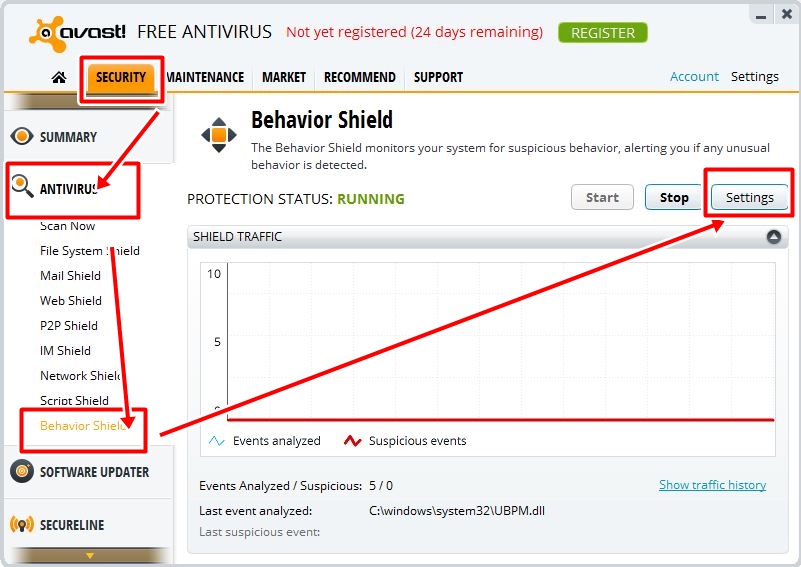
1. Open you Avast antivirus
Windows+8+black+screen+error+avast


2. Select SECURITY from the top and select ANTIVIRUS > BEHAVIOR SHIELD from the settings at the right.
avast+Windows+8+black+screen+error

3. Click on SETTINGS and disable "Monitor the system for Unauthorized modifications" and Click on OK to save the settings. 
avast+Windows+8+black+screen+error

That's it you can restart your PC now and you wont get any Black screen error from now. People who are using Windows 7 also gets the same error and the solution is same even for the windows 7 users.
Read more ...

Best Facebook Chat Tricks


After my post on Facebook Status tricks, i am posting this Facebook Chat tricks which are even better than the Facebook Tricks on the Previous posts. If you have missed that post Do check it now

Facebook Status Tricks

1. See friends who are in online from offline

At times we love to be in offline but still excited to know who are in online at that particular time, but if we directly go online to  see  people who are online. You will be recognized that we are online by others. But using this particular trick you can see the friends who are online by staying in offline. I know that you will be very much interested in trying this trick. So have a glance

At first a Facebook application named “ online now “ helped us to make this trick possible, but later that app got blocked by the Facebook  and after a long search I found this  “ New online now “  

2. Facebook chat list on your desktop:


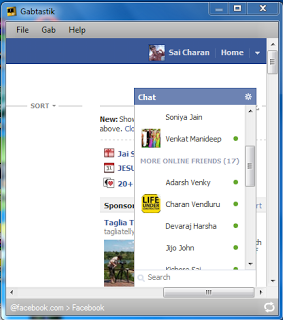
This is an awesome way of chatting with your friend’s .Now you can have your chat list on the desktop itself . . . ! It will be extremely simple for you to make use of this. And I bet you will love this for sure. The interesting part is this app will not be associated with any browser so without opening any sort of browser you can chat with your Facebook friends using this trick.
There are few applications through which you can do this. But recently even Facebook launched its own application with the name “ Facebook  messenger “ . Before i used many sort of applications like this but almost all of them have same features including this Facebook messenger. So i suggest you to use this.

How to use Facebook chat on Desktop 


2. Click on install. With this a small file exe file will be downloaded.
3. Now run the exe file and it will now download Facebook messenger.
4. After downloading it will get installed and when you open it by entering the email address and password you can get your Facebook chat list on your desktop itself.

3. Create your own facebook chat codes to use in chat box:


I have seen many people sharing some text codes for some images on their Facebook status and in groups. There are also few Facebookpages which provide you some codes of some images to use in Facebook. Then i wondered how these codes can be generated and after some goggling I found a site where we can upload a images and get codes for that image with in seconds.  Using codes designed by others is an old fashion let us know define our own chat codes and use them. Isn't it lively? You can do this just within a short span of time.
Get ready folks ...here is the trick...

How to Create Chat codes for facebook chat


1. Go to Smileyti 
2. You can see the upload button on the home page itself just click on it . Browse in your PC and upload an image to which you want to  get code.
3. Now it will generate some code and that is the code for the image which you uploaded. Copy that and use it in your chat box .

4. Go offline for particular friend   


Many times some particular friend will be annoying us in Facebook chat. And if we need to get rid of them we  have to go offline but if you go online you can’t chat with other fiends but with this recent Facebook updates you can go offline to particular person......!
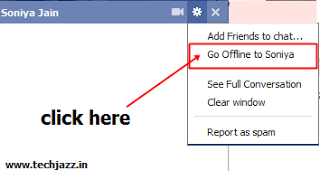
Check the below screen shot to know how you can do it, or else follow the below steps.

How to go Offline for a Particulat person on Facebook

1. Open the chat box of the friend to whom you want to go offline
2. Click on the settings button on the top of chat box

3. You will see “ go offline to “ option there just click on it and you are done with it. Now to that particular friend you are offline. .
So what are you waiting for get rid of all annoying facebook friends.

 5. Facebook chat smileys:

Smiley’s or emoticons are the most adorable things in any conversation .Whatever the feel you have whatever the way you express without a smiley it is unfulfilled .Just a single smiley can make a conversation complete .Here is the list of some cute smiley’s which will drive you crazy....
Well there are many sort of facebook smiley’s to use in chat boxes.  Up to recent times if we want to use any sort of smiley in facebook, we have to type it manually with keys. But with the recent facebook updates we can access 21 awesome smileys just with mouse. They are available in your chat box. Check the below screen shot...

But there are few more smileys other than the list mentioned in chat boxes, which you can use. Here are they..

1. Penguin Smiley                            :-             <(")
2. Shark Smiley                                  :-             (^^^)
3. Putnam smiley                             :-             :putnam:
4. Robot Smiley                                 :-            :|]
5. Kiss smiley                                      :-             :*

6. Add facebook chat side bar to your Mozilla Firefox browser:


If you are a user of Mozilla Firefox browser then here is a way of bringing a brand new look .You can have a side bar in the browser where the chat list appears .It gives you a cool look indeed and you will enjoy this. This is very useful to people who use to browse in multiple browsers. If you are browsing on internet with many tabs opened it will be very inconvenient for you to chat on facebook because we need to go for facebook tab each and every time to chat with your friends. But if you make use of this trick you can have a chat side bar in your browser which will be visible to you even if or on any other tab. .

Here is an step by step way of getting chat side bar in Mozilla Firefox. . !
Follow the steps bellow

How to Add Facebook chat side bar to Mozilla Firefox


1. Open Mozilla Firefox Internet browser and press Alt key in your keyboard.
2. Select bookmarks from the list and select "show all bookmarks”
3. From the opened box select unsorted bookmarks > organise > new bookmark
 4. Now again a box will open, in that type “facebookchat “ in first box and type
 "http://www.facebook.com/presence/popout.php " in second box .
Click on load this bookmark >add
5. Now again press alt key > view > side bar > bookmarks>
6. Now select facebook chat from the bookmarks in slide bar...that's it..Done

7. Use your friends profile picture as facebook smiley:

We all love smiley’s but, if we could make an innovation in it, how would it be? We do use all types of smiley’s but what if the smiley is the profile picture of your friend? That definitely sounds great then why to delay try this out...
Check the image below to know how it appears in chat!
To make your friends profile picture as a smiley we all need is his facebook username. Every facebook user will have a unique username. To get your friends username go to your friend’s profile and check the URL. It will look something like this .
https://www.facebook.com/username
Here and whole letters after the facebook.com/ are considered as username. For example if you go to my facebook profile it will look something like this.
so my facebook username is “ saicharan “.
SO now you have your friend’s username then all you to do is just putt that username between double square brackets in chat box and hit enter.
For example to get my username as facebook smiley this is how you should add
[[saicharan123]].
Try this with your friends surprise them.  .!


8. Use facebook chat from your mobile:-


There are millions of facebook accounts and users worldwide and with the rapid growth of facebook users the number of people using it through mobile also increased. . ! With the entry of smart mobile phones it to the market the applications related to social networking sites like twitter, facebook, MySpace, etc has also increased. Coming to facebook, we can use the facebook from any mobile internet browser but unfortunately we can use facebook chat from browsers . . . !
But there are few apps through which we can use the facebook chat from mobile with some awesome features. Here are few apps which you can try.

10. How to send images and files in facebook chat.


We are using the facebook for most of the time in a day, many of us are not aware of all the facebook features. This is one among them. We can send some small files like, text files, images, windows MS files, Rar files and lot more. This is very useful for us to share files with our fiends in short time.
Here is how you can send images and files through facebook chat . . . !

How to send images and files In Facebook Chat

1. Open the chat box of your friends to whom you want to send file or image
2. Now click on the settings button at the top of the chat box and select “full conversation “
3. Now full conversation box will open and now all you have to do is click on the pin symbol below the input box.
4. Now a pop up box will open asking you to select the file or image then browse in your pc and select it. It will take some time to upload (depending upon your internet speed and file size)
5. Now simply click enter and you can sent some file to your friend using facebook chat successfully.

Read more ...

Best Facebook Status Tricks - Revealed !!


Facebook is a pretty interesting world, isn’t it?
Using some tricks  and making our friends to get surprised is much more interesting. Tech Glitter will bring your some unique tips and tricks related to Facebook to have more fun with it J. In this post I will let you know about the some of the best collection of tricks that are related to facebook status.  Check this post for BEST STATUS TRICKS.

Facebook+status+tricks+Best+top

1. Pre Schedule your status on Facebook

Using this trick you can post your status at any pre scheduled time, No matter whether you are logged into the account or not, your status will get updated automatically on the exact time that you have scheduled earlier. There are many ways to do this but this one is really simple and easy to do..

How to Pre-schedule a status on Facebook.


1. CLICK HERE to start the trick and as soon as you go to the site click on LOGIN with Facebook.

2. Allow the application to access your details and you will see something like this. Just Enter your status and set the Date and time and hit Enter
facebook+status+tricks+later+Bro

3. Later you can check that the status will get updated on the exact time that is scheduled. Here is the screen shot of my status.
Pre-scheduled-status-facebook

You can even make the status post in repeated status. You can also use the same site for post tweets in you twitter.

2. Make an empty status / comment in facebook 

Generally we can’t send an empty message on facebook and even we can’t update an empty status on facebook but now we can make this possible. Are you ready???

You can update empty status in two different ways.

1. Press and hold ALT key and type 0173, No text will be in the Status box but you can update your status blankly.
                                         OR 
Facebook+empty+facebook+status

2. Just put this code in your status and post it, still you can see a blank status

Using the first trick you can post an empty status.

3.  Update your status in different text styles on Facebook

Are you bored of using the same font on face book? Want to have fun with funky and freaky text...? OK now it is the time to jazz up your status with a trendy new look .You can use a wide variety of font styles to get rid of the monotony. This trick will help you in making this come true......

There are many sites on internet which can give you different text styles but with the help of Name funk you can just have your text in five different ways by typing once

1. Funky                                               text  ѕαмρℓє тєχт ƒσя ∂ємσ
2. Arabic text                                     รค๓קlє tєץt Ŧгє๓๏
3. Hacker text                                     54mp13 73x7 f0r d3m0
4. Flipped text                                   sɐɯd1ǝ ʇǝxʇ  ɟoɹ pǝɯo
5. Changed case text                      SaMpLe tExT FoR DeMo

4. Backward text effect for your Facebook Status trick

backward+text+effect+status+facebook

If you just want to reverse whatever you write and update it as a status then here is a trick awaiting for you. Try this out and feel the fun of reverse reading and you can even draw the attention of your friends.
Go to Upside-down text  and type your status in the first input box on the site. Just copy the Upside down text from the second post and paste on Facebook and updates it as your status.


5. Update your status with text in bubbles on Facebook

bubbles+status+facebook+tricks

You might have seen bubbles in movie posters or else in the uploaded pics of Facebook but how smart it would be if we have such stuff in status too. Isn’t it crazy going? This is very simple to do.
Go to Bubble all text   and type your  text in the box provided there and copy the bubble text on to your wall and post it.


6. Hide Status from Certain People in Facebook

facebook+status+tricks+privacy_settings

Privacy plays a key role in most of the times. We don’t want everything to be disclosed to everyone but in Facebook we have myth that all our status messages can be viewed by all our friends but it isn’t true anymore .We can hide them too. Just do this and starting having privacy even with your status.
Although this is quite simple trick to perform many of you may not know about this.
Before posting the status just click on public > custom > and a box will pop up there you can alter the settings as you wish to hide your status from particular person or a group of people as you wish.

7. Add different symbols to your status...:

Symbols make texting feel better not just better even sometimes best. Facebook allows us to have a good usage of several such symbols you might not have been used earlier. Here is the way of doing it. Here are few of them
                                  
                                   ۵
                                  
Go to Fbsymbols and there you can find huge collection of symbols which you can use on Facebook status. Just copy paste them along with your status and turn your status to feel better. 

8.  Prank your friends using this trick on Facebook

Once check this Url
 http://facebook.com/profile.php?=73322363  
When someone click on it will redirect them to their own profile.  We can use this link to play pranks on our friends and make fun with them
just keep your status like this ..
" Don't believe this guy he is really a shit --> @ http://facebook.com/profile.php?=73322363  "
When any of your friends clicks on this link he will be redirected to his own profile, so he thinks that you have mentioned him in your status. i tried this and many of my friends messaged me, to remove my status thinking that i have mentioned them in my status.... 

9. Update Facebook Status Via Blackberry,Iphone etc:

When you update a status through mobile,it appears  as if “via mobile 2min ago” or something else like that. To make further more interesting you can customize it by yourself i.e. instead of the text “via mobile” you can make it as “via iphone 4s” or else “via notebook or “via pen” or whatever you want by using some interesting tricks. The interesting part here is you will update your status from your PC but you can make it appear as if it is updates from other devices.

Check this Screen shot below, Actually i'have updated my status Via PC but using this trick, i made it to appear as if i updated my status using mobile.
update+staus+via+mobile+trick+facebook

Here goes the trick
1. Go to Status via 
2. Select any device through which you want update your status. This site will let you update your status via following devices.
1. via BlackBerry
2. via iPhone
3. via iPad
4. via Android
5. via T-Mobile Sidekick
6. via Windows Phone
7. via Facebook for Camera EOS 50D
8. via PlayStation 3
9. via Ovi by Nokia
10. via SonyEricsson
3.  After selecting any of them a box will pop up with an input box. Type your status in it an update it. That’s it your status will get updates with device that you wish.

10. Turn Status Update into Cool 3D Words:

Facebook+status+tricks+3d+effect

3D is one fabulous word that created a breakthrough in the field of graphics. Everyone loves watching a 3D movie or a visual, it is an eye feast. Even Words in 3D gives a great look and feel.
Using a cool app you can have a 3D view of your status. You can also share the results with your Facebook friends by posting it on their wall or by adding it to your profile
Here you go. . ! 
Go to  Status Analyzer3D and allow the application and after taking few seconds it will analyse your recent status updates and displays you as an 3D image.

Try all these tricks and i am pretty sure that you will love to use each one of them.
Read more ...

Top 10 Google chrome extensions for Facebook


There are many Extensions available for the Google chrome browser and these extensions in the Chrome browser are similar to the add-ons in the Mozilla Firefox browser. By adding these extensions to our browsers we can do many things while we are browsing on the internet. They really help us a lot on various issues. 

Even we can do many things on Facebook by using extensions for Google chrome browser. Here is the list of Top extensions for Google chrome to make your things fun on Facebook.


Google+chrome+extension+facebook+colour

 Unlike Orkut, Facebook won’t provide any option to change themes and colours in user’s profile. Using this extension you can and the colour of Facebook to any colour that you wish. After adding this extension to your Google chrome Browser Re-start your browser and click on the icon of the extension, from the options provided you can set any colour that you wish.

Top+google+chrome+extension+facebook

This is an yet another interesting extension available for Google chrome to change the background of the Facebook. You can select any image from the given pics as your Background image . Instead of having boring Dumb blue colour you can add the Background images to make your profile look even better.

facebook+ad+blocker+extensions

Ads on Facebook are always annoying. These days Facebook is concentrating on money than user’s satisfaction. We normally used to see many ads on the right side of the Facebook. Now by using this particular extension you can block those ads from appearing on your browser whenever you use Facebook.
Facebook+google+chrome+extensions

We used to use lots of apps on Facebook and while using that all the apps will ask to grant permission to access our information, many of us used to blindly allow all the permissions for that app. Taking this as an advantage many apps used to post on our Facebook wall without our notice.
By using this extension we can get suggestions regarding the app as shown in the screen shot.
facebook+chrome+extension

By using this Google chrome extension you can notifications about your faacebook new chat messages even while you are browsing other websites on other tabs. This is quite interesting Google chrome extension for Facebook.
facebook+chrome+disconnect

Have you ever noticed this, while you visit a website which contain Facebook like Box, Facebookwill show your friends names who liked that page previously. Facebook stores our information and leaks it to other third party apps, Facebook tracks us. By using this extension, we can stop that tracking process done by Facebook.
facebook+invite+all+friends+extension

In case if you need to invite all of your friends for a Facebook event or if you wish to invite all your Facebook friends to like you page, it is difficult to select each one of them, to get rid of that difficulty we can use to Google chrome extension and invite all your friends in a easy way
Facebook+for+chrome

This is just an unofficial extension for Google chrome to access Facebook instantly. This extension is useful in many ways.
Facebook+image+zoomer+extension

This is a very Interesting Facebook extension for Google chrome which enables you to zoom all the images when you just hover your mouse on the image on Facebook.
facebook+best+chrome+extensions

Facebook, Google +, Twitter are the leading social networking sites now and many of us used to spend lots of time on them. Just imagine how awesome it would be if you all these social networking sites are together. Just install this Google chrome extension and then you can mix all the three social networking sites.


Read more ...

Security measures for Facebook to protect from hackers in 2013


These days thousands of Facebook accounts are getting hacked each day. . .!Being a Popular social networking sites Facebook is always a target for hackers all around the world to spam it, though Facebook has good anti-spam protection, I have seen different spam’s on Facebook profiles many times.


CHECK THIS

How to Check Whether your Facebook is Hacked ?

If you read this post completely and follow all the rules carefully, then I am pretty sure that it’s almost impossible to hack your Facebook account.
facebook+security+tricks

This post is divided into 2 parts

                              1. Facebook security settings

                              2. General Security tips


1. Facebook security settings to protect your Facebook account


Facebook itself has provided some security settings to all its users, so that we can protect your accounts.


Click on the small settings button at the top right and select “ ACCOUNT SETTINGS “from it, you will redirected to a page and there select “SECURITY” from the options provided at the left side. So now you are in the security settings page of Facebook and now let’s see them one by one

A) Always browse on HTTPS (secure Browsing)


Click on “EDIT” and enable secure browsing and Click on the save settings, this will let you to always browse on secure network while you are on facebook

You might wonder Why i am asking you to do this,Do you know ? While you are in a WiFi network others who are in same network  can easily break in to your Facebook account by stealing you Cookies, if you are browsing on “http”. This can be done using tools like “ wire shark”. So it is better to browse in “https” connection.

B) Enable Login notification to your Mobile


Click on “EDIT” and tick both email and text messages to get notifications to both of them. In the case, if you haven’t confirmed your mobile phone or email address yet, First do it and then save your settings.

Using this feature you can get a mobile text message or an email if someone login into your account, from unrecognized devices. This will help you to take immediate action and I personally love this feature on Facebook.

C) Create a separate password for Facebook apps


Click on “EDIT” and then click “Generate app password”. A pop up box will open, there first enter your password for Facebook account, choose the app and then enter your app password. So From now you can use that particular password for that app.

Few apps on Facebook will ask your password to use that particular application. Taking this as an advantage, many created apps just to steal passwords of others account. So create a separate app password for applications and you can use that password before using the apps.

D) Manage “ recognized Devices”


Go through all the Recognized devices and if you found any suspicious Devices over there, just remove them and Facebook will take care of the remaining thing.

E) Verify Active sessions


Active sessions will show information about your recent and active logins in your Facebook account. It includes which browser you used, location, time and date. If there is any active session from any other suspicious place then just click on “End activity” and remove it.

Last but not the least change your password frequently

CHECK THIS

How to Check Whether your Facebook is Hacked ?


2. General Tips to secure your account from Hackers


A) Beware of Fake pages (phishing)


These days people are getting hacked more by falling in the trap of fake pages. This is called as phishing. Fake login pages will also looks same like the normal Facebook login pages but those are indented to get the login details of victims

Here is the screen shot of both fake Login page and Original Login page.

By keen observation of the URL you can figure them out . Don't login into any page if and only if the URL contains facebook.com. Some cleaver hackers even will use the domains like faccb00k.com , Fakebook.com etc, which looks similar to facebook.com but they aren't the same.

So check the URL before you login, Login only if you have facebook.com as your domain

B) Use Onscreen Keyboards to Protect from Key loggers


There are some spyware tools known as key-loggers  once if they are installed in  your PC then they will send all information that is entered from your PC to the one who programmed that key-logger.

So the counter strike for the key loggers is to use onscreen keyboards by using onscreen keyboards.if you use onscreen keyboards while entering your Login details, they key-loggers cant detect the data that is being entered by the key loggers as they only record information from keystrokes

How to use Onscreen keyboards in windows

1. Press “WINDOWS KEY” + R
2. RUN box will open and there enter, OSK it will open the Onscreen keyboard instantly
3. Now open facebook.com and now you can enter login details by clicking on that onscreen keyboard.

D) Avoid installing cracks and key-gens


Most of the Cracks and key-gens that are present in torrents and other Downloading site contain virus or spywares that are indented to spy on the victim who downloads and installs it.

So it’s better to stay out of those cracks and key-gens.

E) Use Good anti-virus and Anti-spyware


In most cases all the spywares and viruses in your PC will get detected by the antivirus, hence i recommend you to use an Good antivirus. Please don’t use old versions of antivirus or the cracked ones. Do buy antivirus full version so that you can update them. Daily millions of viruses are entering into internet arena, so updating the antivirus is the only option for so to protect our self from all those spywares and viruses.
CHECK THIS

Top 10 Antivirus For Android Mobiles 

Here is the list of few most used anti-virus products go through them and use one for your PC

  • Kspersky
  • Avast
  • Avira
  • McAfee
  • Norton
  • AVG
  • Symantec
  • Bitfinder

    Buy anyone of them and use it on your PC, Don't forget to upgrade them frequently

    F) Don’t share or write your password anywhere

    Many people have this habit of sharing their password with others or writing them somewhere. Please stop doing this at least now. I used to see many of my friends sharing their passwords with their girl friends, and that really sucks.
    Password sharing is not recommended and don’t even save your passwords on your PC.

    G) Never save your passwords in your browser

    Instead of remembering passwords many people used to save their passwords in their browsers using “Save Password” feature provided by the Browsers. Do you know Passwords from any browser can be easily Decrypted using simple decrypting tools and it don’t even take much time to figure out passwords stored in the Browser.

    Try to remember password and remove all your stored passwords now using CCleaner software.

    H) Use strong password


    Always use a strong password, which should be combination of Lowercase letters, uppercase letters,numbers and symbols so that it will take much time for hackers to Brute-force it.

    I) Use different passwords for different sites


    If you use same password for Both your email address and Facebook then you are giving 1+1 offer to the hackers. If anyone of them is hacked, the other one will get hacked too.

    Try to Use different passwords to each site
    CHECK THIS

    How to Check Whether your Facebook is Hacked ?

    Final Words:-

    Though I am aware of all the ways to hack a Facebook account and their counter strikes, I can’t say that,” I can stay 100% safe on the internet” , because there are chances for anyone to get hacked online.These days with the advancement of hacking tools, hacking became very easy and still securing is damn difficult.
    “To hack a website you just need to find single vulnerability out of many, but to secure a website you need to find and fix all the vulnerabilities, which is really a risky task”

    Securing is really difficult Job, all we can do is to be aware of all the securing ways on internet and get updated with latest security tips. Stay connected with TECH GLITTER, We will provide you more and more tips on Internet security.

    Happy Facebooking :D

    If you feel that I've missed any point regarding securing our self on internet, do mention them in comments and I will add them to this post...!

    Read more ...

    Find your Friends crush name - Facebook Prank

    This is Fourth  post in the sires of posts on “ Facebook Pranks”. If you didn't the checked the previous posts you can check it from here..

    Facebook Pranks collection


    Many of our shy friends wont let us know about their crush name, But what if we are capable of finding out our friends crush name, We can tease them a lot ...!

    This seems to be interesting wright ? yeah it will be...
    You will start having more fun, once you started using this..

    How this prank works


    You will send a link to your friend, which will look like Love calculator. You will somehow make him believe that it can calculate love between people very accurately. So when your friend  enters his name along his crush name, instead of calculating the love, it will send  your friends crush name to you  ;)

    Few days ago one my friend sent me link saying that it is a perfect love calculator, I entered some names of Hollywood actors to check it, some how i didn't enter My crush name ;)

    Now its time for you to know your friends crush name

    Finding your friends crush name


    There are several website through which you can make this prank to work, here i will a show a tutorial of bext site among them and i will mention the other sites name so that you can check them latter.

    5 ways to find your friends crush name


    1. Crush Bits


    1.  First click here to register

    2.  Enter all the details provided over there and make sure that you enter a valid email address and remember the password

    3.  After entering the details click on the “create link”. It will redirect you to another page which contains a link,copy it and that is your link, which you have to share it on Facebook. Simply send it to your friend on Facebook or just make it as your status.

    4. When your friend opens that link this is how it looks like, when he enters his name and his crush name both if them will get saved in your account on the same site. you can check it by logging in to your account from HERE.

    2. secret-loves


    3. Magic crush


    4. crush page


    5. crush007

    Read more ...

    Fake news Generator - Facebook Prank


    This is the Third post in the sires of posts on “ Facebook Pranks”. If you didn't the checked the previous posts you can check it from here..

    Facebook Pranks collection


    What are fake news generators ?
    how can you Prank others ?


    Using fake news generators you can create fake news about friend and you can share the link on facebook, so the people who visit the link will be directed to the site where there will be fake news about any of your friend that you wish.

    When i saw a link regarding my friend, I really thought that was a genuine information. Later i came to know that, it was a prank my my friend. Even many of my friends thought that it is a genuine link. That made me to Google about this fake news generators and i found few sites regarding it.

    4 Fake news generators/Creators  to play pranks on Facebook.


    Out of all the fakenews generators on internet the noob is very interesting to use. you can add your frieds profile picture in the fake news. Check it out

    1. Noob – fake news generator


    Here is the way to create fake news using Noob

    1. Go to  http://www.noob.co.in/

    2.  In the first box there will be about 20 fake headlines, from which you can pick one. Make sure that , the headline should be similar to your friends activities,so that there are more chances for you to make people believe.

    3. In the 2nd and 3rd boxes enter your friend’s first name and second name of the one, on whom you want to play the prank.

    4.  In the fourth box you have to enter your friend’s Facebook USERNAME so that he his profile picture will appear on the site. To get his username just open his profile and in the URL copy the text after Facebook ,for Example if your open my profile it will be like www.facebook.com/saicharan123. so “saicharan123” is my username for Facebook  In a similar way add your friends username over there. This is optional and if you don’t want your friends profile pic to display over there you can skip this step.

    5. Enter you location over there and click on Fish you can share that link on Facebook,and you can prank your friends with that . :D

    You can aslo check the folowing other similar sites

    2. Wasarested


    3. The Newspaper Clipping Generator


    4. Fakeawish


    Make sure that the news you will select to Prank your friend should be smilar to his activities , Only then you can make this prank work..!

    Read more ...